/genjutsu:cast
A slack row opens into its tide detail, on iOS
on a starting fixture
- model
- claude-opus-5-5
- date
- 13 November 2026
- cost
- $1.53
the request
/genjutsu:cast Étale's iOS day list should open into the tide detail as one surface, not a push
Étale is a fictional slack-water app, made up for this example. Its numbers are real NOAA predictions for 2 October 2026.

Nobody is available to answer questions during this session. Up-front answers to the gates:
- Preview mode: A. Write each preview as a standalone HTML file under preview/ in the project.
- Scope: the Today list and the tide detail it opens. You may edit and add Swift files under Etale/ and write previews under preview/; create nothing outside the project. Etale/ is a folder the Xcode project keeps in sync with the disk: a Swift file added there is compiled, so do not edit Etale.xcodeproj.
- The app targets iOS 26 and is built with Xcode 27. Xcode cannot run in this session: do not try to build. There is no network: install nothing.

Finish with the final report the pipeline asks for.
how it was made
- genjutsu
- 4.1.4 at 3e0d6d3, plus the two module-fix commits that shipped in 4.2.0
- model
- claude-opus-5-5
- run
- One-shot, headless
- harness
- claude plugin eval, Claude Code 2.1.323
- selection
- Shown from 6 runs of this prompt on four genjutsu commits; the only run on this one
- cost
- $1.53, 22 turns
- date
- 13 November 2026
- scope
- /genjutsu:cast, on a starting fixture
- modules
- motion-principles, mobile-principles, swiftui-motion
No transcript: a headless run has no conversation. The request is everything it was told.
What to know about this run
- Run 2 of six. The same prompt was run six times, on the same model and the same starting app, across four genjutsu commits; every run made is in the receipt, none was dropped and none was run again. Four of the six used the system zoom transition, as this one did; two (runs 1 and 3) built the surface by hand and gave up the navigation stack, the bar and the swipe back.
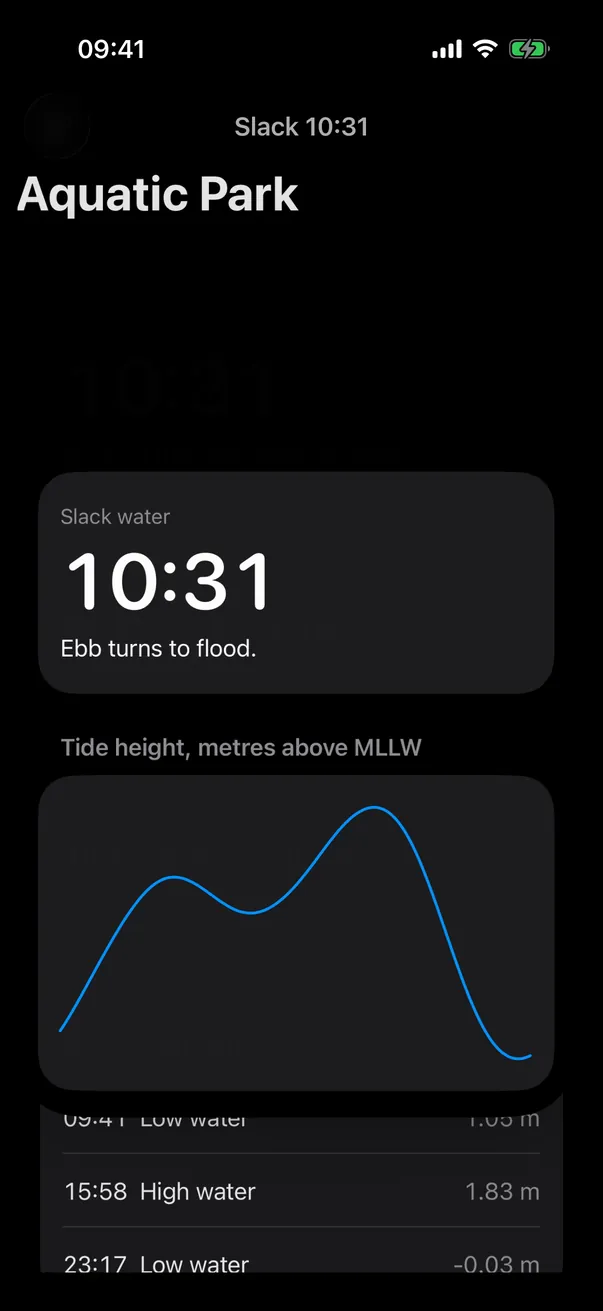
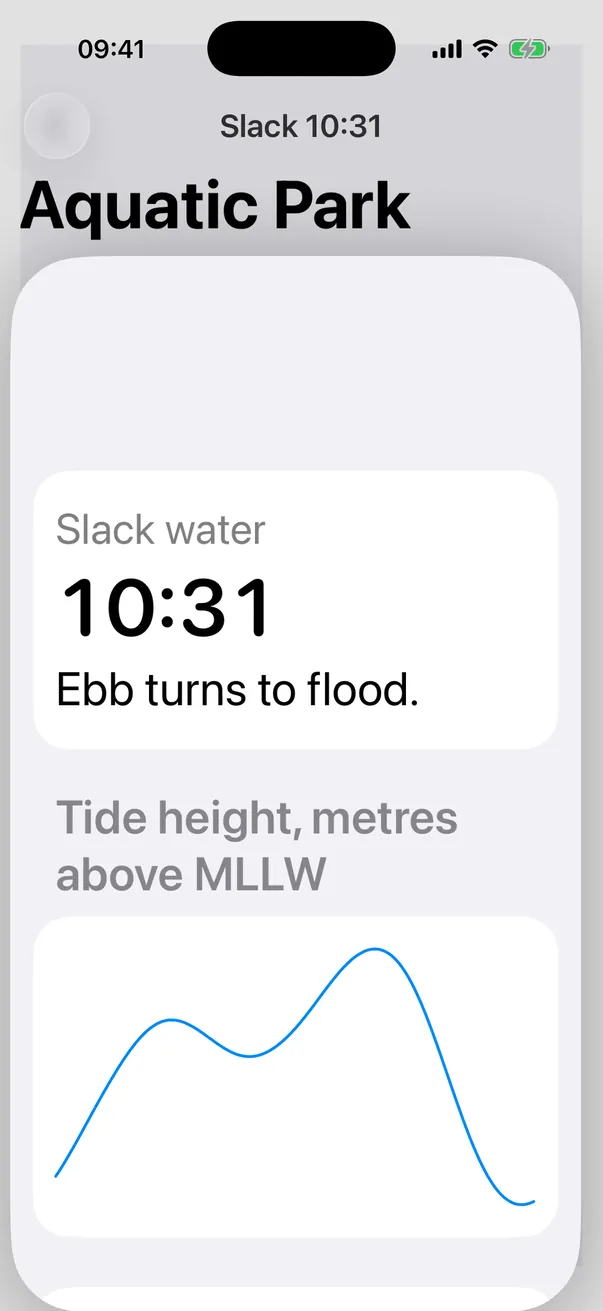
- Its own defect: a white box shows around the row for about 0.4 s after each return. The run gave the zoom's source a background of its own, and that rectangle sits inside the still-grey cell until the highlight fades. It shows at the end of every return in the clip, and one still films it. Not fixed: the build is shown as the run left it.
- Built unchanged on the first try with xcodebuild, with no human edits. The run itself could not build: it wrote its Swift without a compiler and said so in its report.
- Used the system transition: 0 of 1 on genjutsu 4.1.3, 1 of 2 on the fixed modules without the step that reads the thesis against the loaded modules, 3 of 3 with it. That does not prove the step: at the 1 of 2 seen without it, three in a row happens one time in eight by chance, and the step was never seen correcting a hand-built thesis. The three runs that had it had each named the zoom before loading any module, as this run did. The module fixes are not proven either: this run named the zoom before it read a module, and the same fixed modules did not stop run 3.
- Run 3, on the 4.2.0 release branch with the same fixed modules, built a surface by hand again: the time lands on the wrong row, the large time sits under the Dynamic Island and the list shows under the detail. Run 1, on 4.1.3, has a drag to close that flickers on every frame.
- Why run 2 is the one shown: no later run is clearly better. Runs 4 and 5 show a larger white box, run 6 has none but the line draw its thesis promises cannot be seen, and its Reduce Motion problem is open, and run 2 is the only zoom run filmed under Reduce Motion, in dark appearance and at a large text size.
- Its own audit: 11 checked, 2 problems, 3 handed over. Both problems come from the check "Loaded modules against code": the marker's 0.35 s delay and 0.45 s spring add up to 0.8 s on paper, over the 500 ms limit, and that delay is a guess at a duration the system owns. Its thesis is marked UNVALIDATED: nobody was there to say yes. The thesis also misdates the API: the zoom transition shipped in iOS 18, not iOS 26.
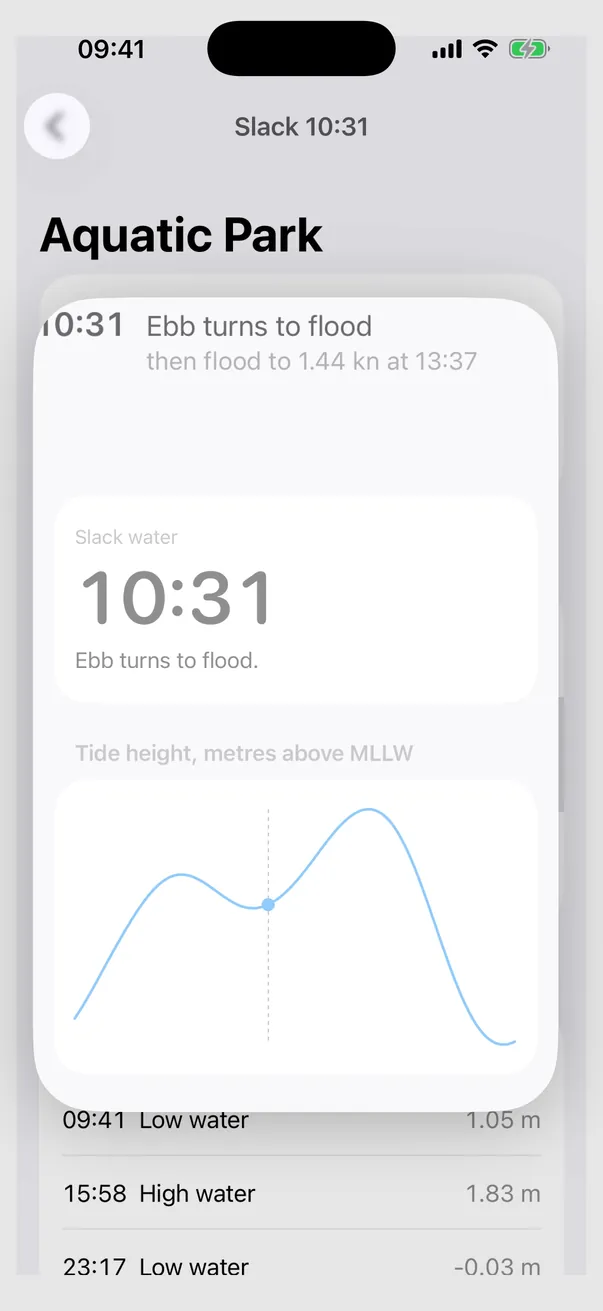
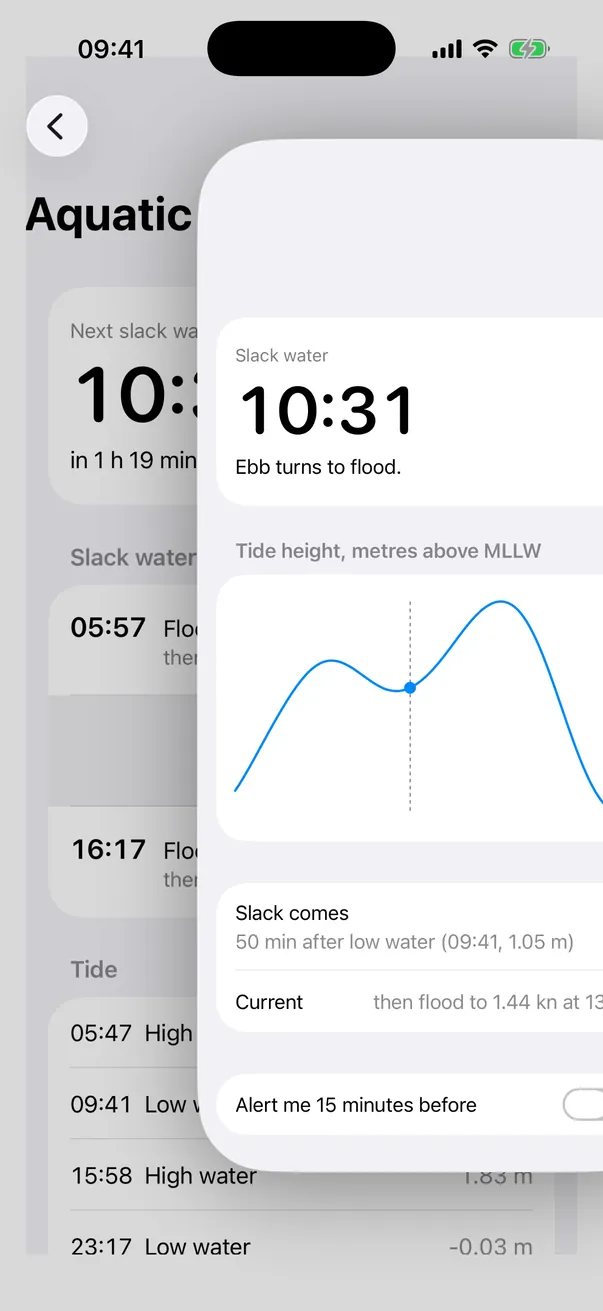
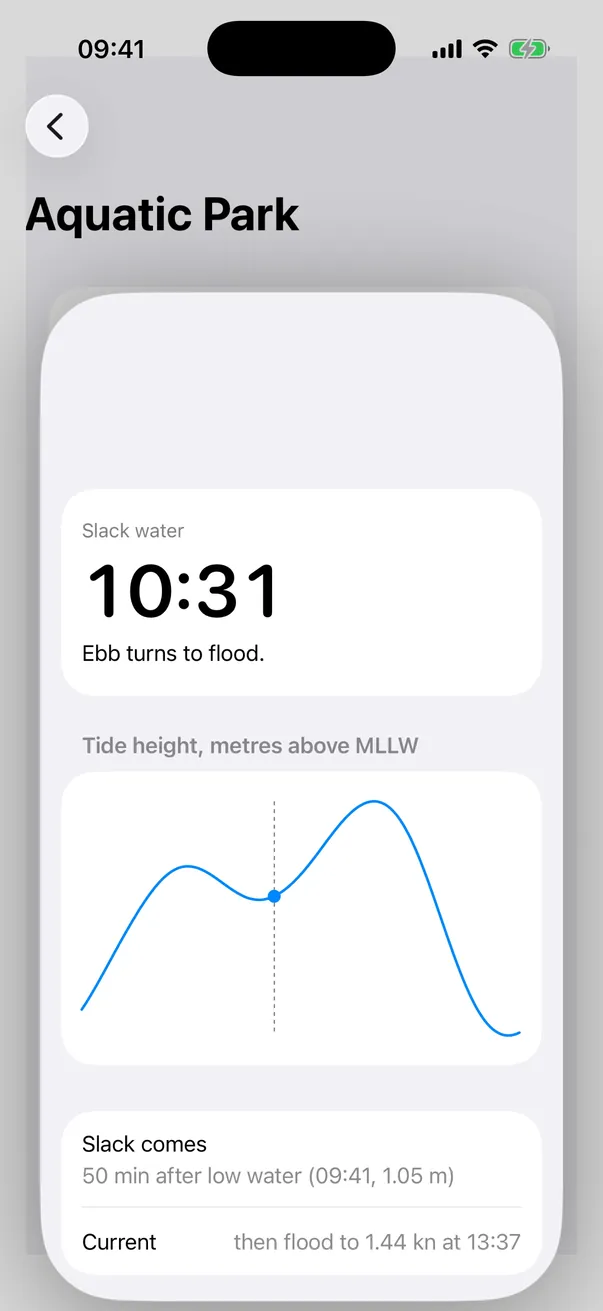
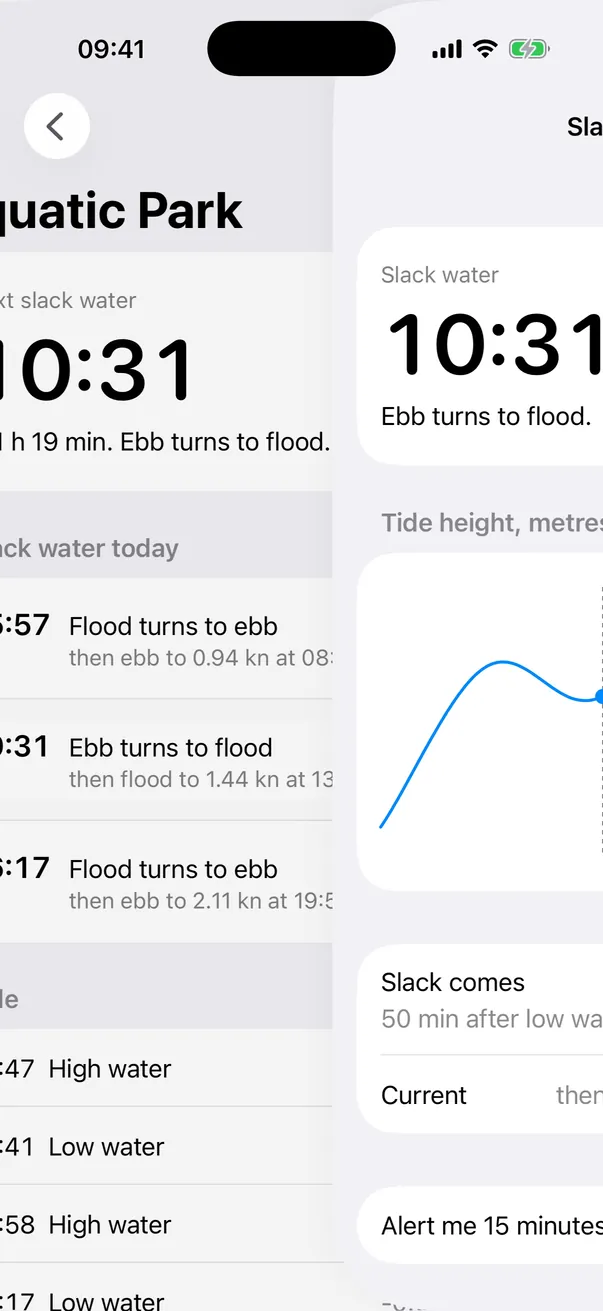
- The system owns the zoom, its curve and its duration. The only motion that is the run's own is a dashed rule and a 10 pt dot settling on the tide curve. Under Reduce Motion the detail arrives with the system push, a full-screen slide, as in the starting app. The run's audit did not list that slide; a strict reading of swiftui-motion would.
- Simulator only: no real device, no VoiceOver check, no frame timing. Of the four zoom runs, only this one was filmed under Reduce Motion. The harness graders give all six runs 5 of 5, the hand-built ones included: they check that the skill fired, loaded its module and touched the list, not what the transition is.
Stills
Taken from the same build as the clip and described by the receipt. Re-encoded as WebP at their captured size; each opens full size.
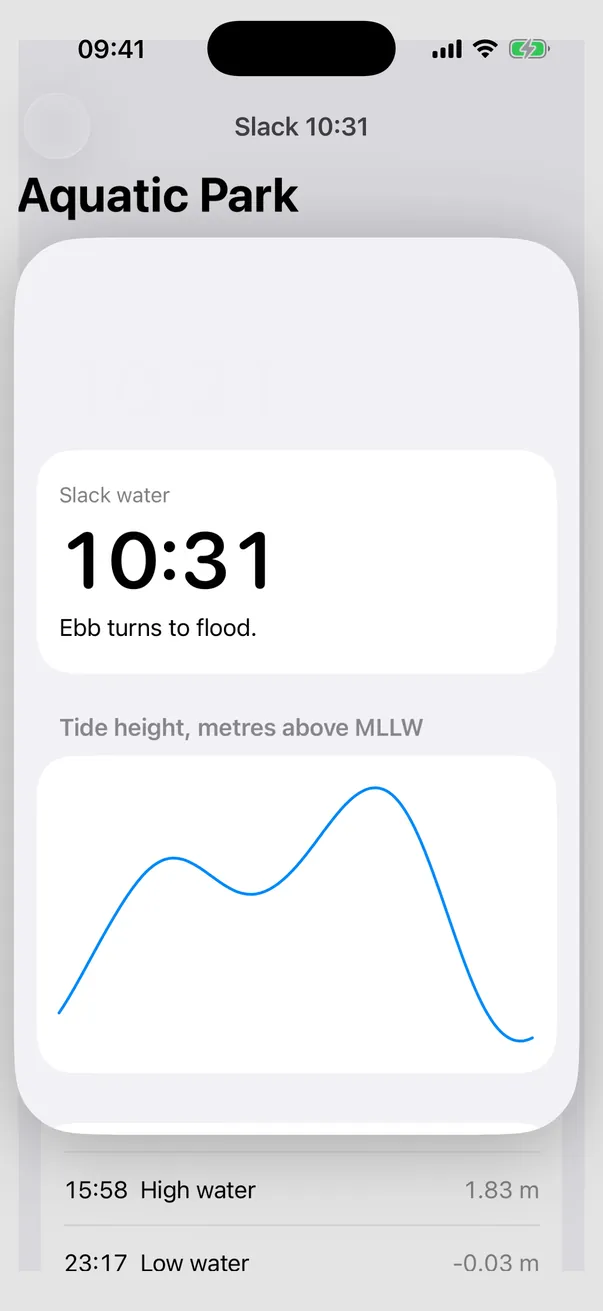
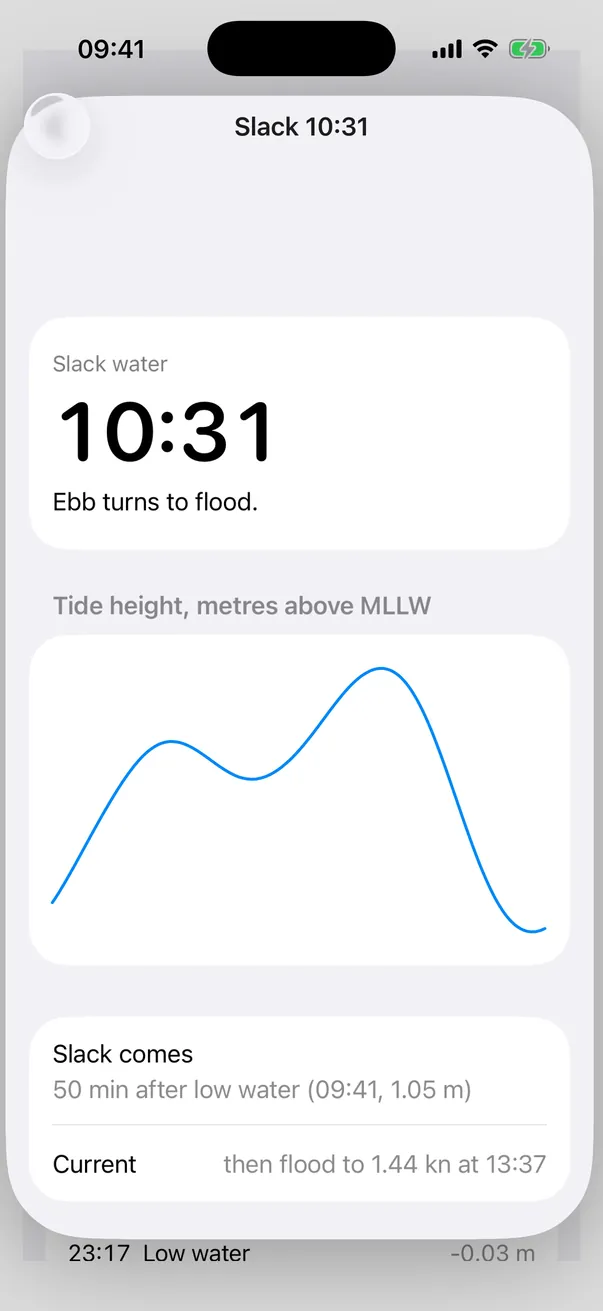
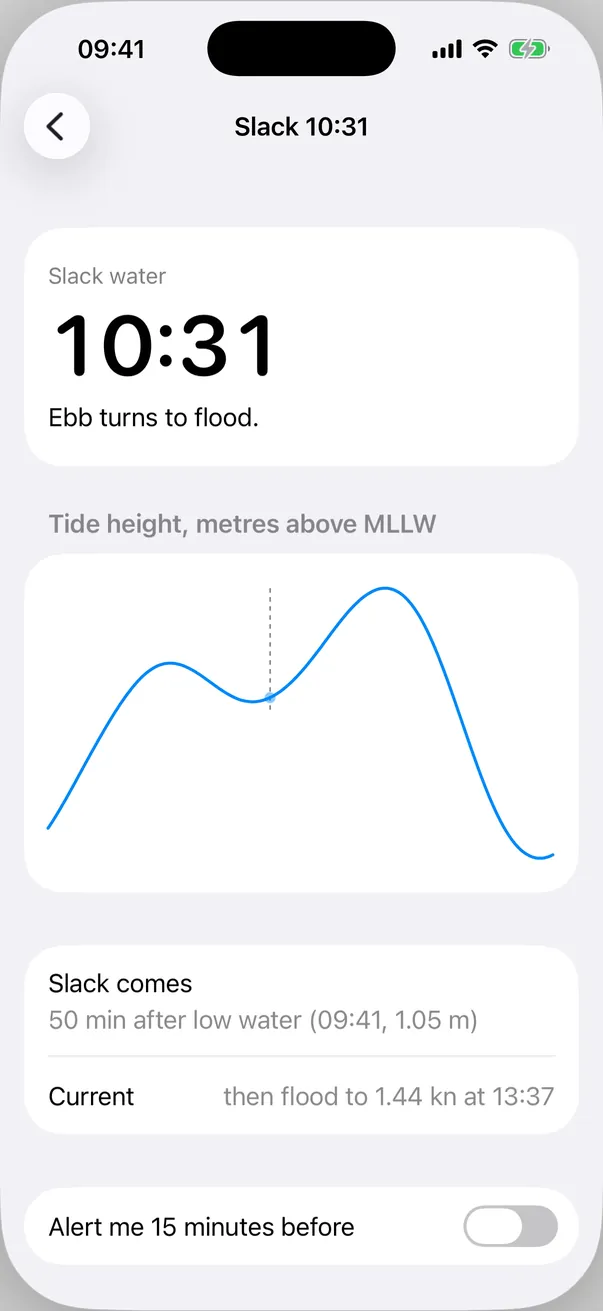
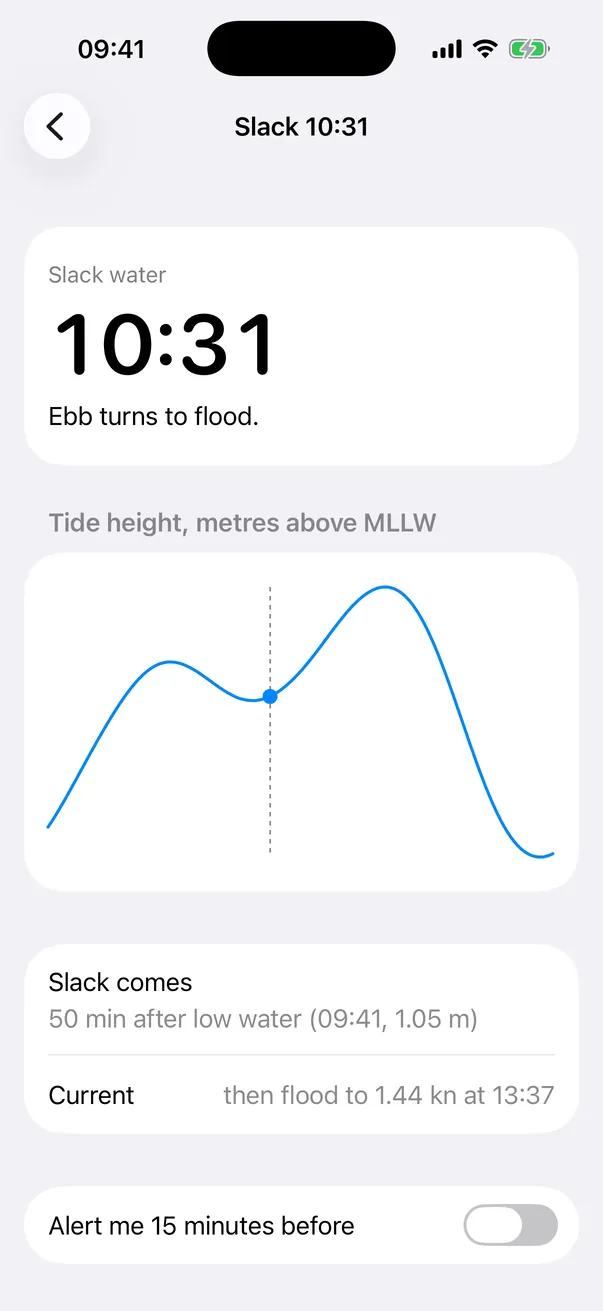
The receipt
Written when the run was recorded and shown here as written. File names in it point at the recording workspace; the stills above are the same images. The raw record is receipt.json.
Six runs of one prompt, told in order. The first native example: every other one here is a web page. The same prompt, the same model, the same fixture and the same harness each time; what changes is the genjutsu commit. Every run made is here: none was dropped, none was run again. Each built unchanged on the first try, with 0 human edits.
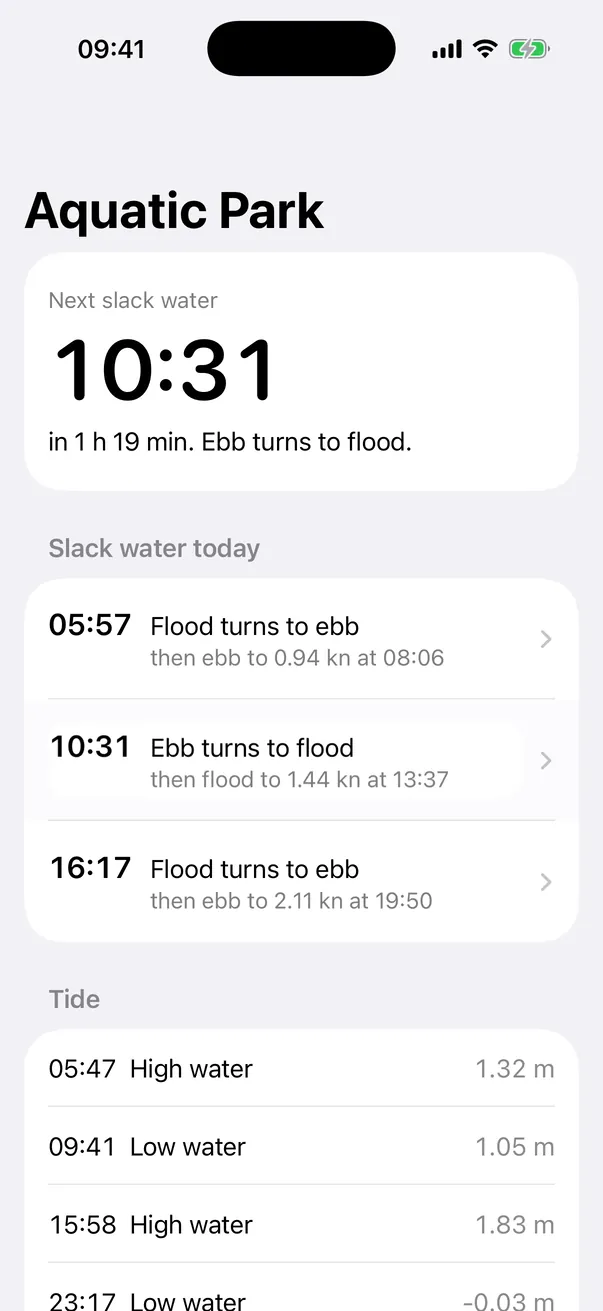
What is the runs’ work here: the way a slack row opens into its tide detail. The starting app (cases/etale-ios/app: the Today screen, its copy, the NOAA data, the tide curve, the alert switch) was written by hand for this case and held no animation: a row pushed the detail with the system transition of NavigationStack (before/push.webp).
- Run 1 (genjutsu 4.1.3) replaced that push with a hand-built card that grows out of the row. It rewrote the list and the detail screen (487 lines), gave up the navigation stack, the bar and the edge-swipe back, and left a drag-to-close that flickers on every frame.
- Its defects pointed at three gaps in genjutsu’s modules. Those were fixed.
- Run 2 (the fixed modules) used the system zoom transition (
matchedTransitionSourceon the row,navigationTransition(.zoom)on the detail): 78 lines added, none removed. The stack, the bar, the back button and the edge-swipe back are all still there. - Run 3 (the 4.2.0 release branch, the same fixed modules) did not. It hand-built a surface again: 434 lines added, 59 removed, the stack and the bar gone, and on screen the time lands on the wrong row. Its audit printed the new check with “hand-built surface instead of the system zoom transition” as a problem, and changed nothing.
- That pointed at the order of the pipeline: the thesis is written before the modules load, so what a module teaches arrives after the decision. A step was added to
castandpaint: read the thesis against the loaded modules before any code, and with nobody answering, rewrite it on the module’s way. - Runs 4, 5 and 6 (the release branch with that step) all used the system zoom, in 15, 13 and 22 lines. In all three the thesis already named the zoom before any module was loaded, so the step had no hand-built thesis to correct.
What the six runs show
| Used the system transition | |
|---|---|
| Before the module fixes (run 1) | 0 of 1 |
| On the fixed modules, without the step (runs 2 and 3) | 1 of 2 |
| On the fixed modules, with the step (runs 4, 5, 6) | 3 of 3 |
- The step was never seen doing what it was written for. It was written for run 3’s case: a thesis that builds a surface by hand, brought back to the system transition before the code. No run with the step wrote such a thesis. All three named
navigationTransition(.zoom)in the thesis page they wrote before their first module load (so did run 2, which had no step). - Three of three is not proof. If the rate without the step is the 1 of 2 seen in runs 2 and 3, three in a row happens one time in eight by chance alone.
- One way the step could have helped, not demonstrated. Its text sits in
skills/cast/SKILL.md, which a run reads before it writes its thesis, and it names “an overlay drawn by hand where the module starts from the system transition”. Whether that sentence steered the three theses, nothing here can say. - What the step did print. Run 4: “Thesis against modules: no gap”. Run 5: one revision, the Reduce Motion fallback (no more default push; the code now has no Reduce Motion guard at all, and what the system zoom does in that mode was not filmed). Run 6: one revision, a duration cut from 0.6 s plus 0.2 s of delay to 0.45 s, although the step’s own text says a chosen value is a decision left to the audit, not a gap; and it missed the Reduce Motion question, which its audit then listed as a problem and left unfixed.
- Where it printed. In the final report only. In no run did a gap line appear between the module load and the first line of code, and run 5 never printed the gap line in the format the step asks for.
- The module fixes alone are not proven either. On the fixed modules 4 of 5 runs used the system transition, against 0 of 1 before; in each of the four the thesis named it before a module was read. The modules agree with those theses afterwards; they did not stop run 3.
| Run 1 | Run 2 | Run 3 | Run 4 | Run 5 | Run 6 | |
|---|---|---|---|---|---|---|
| genjutsu commit | 5e00595 (4.1.3) |
3e0d6d3 (4.1.4 plus the two module-fix commits) |
5105f53 (release/v4.2.0) |
844f375 (release/v4.2.0 plus the step) |
844f375 |
844f375 |
| Module fixes | no | yes | yes | yes | yes | yes |
| Step “thesis against loaded modules” | no | no | no | yes | yes | yes |
| Claude Code | 2.1.323 | 2.1.323 | 2.1.325 | 2.1.325 | 2.1.325 | 2.1.325 |
| Cost | $3.42 | $1.53 | $2.46 | $1.36 | $1.30 | $1.31 |
| Turns | 22 | 22 | 25 | 19 | 18 | 23 |
| Duration | 898 s | 330 s | 605 s | 268 s | 262 s | 269 s |
| Swift lines | +487 -78, 3 files | +78 -0, 3 files | +434 -59, 3 files | +15 -0, 1 file | +13 -0, 1 file | +22 -1, 2 files |
| Transition | hand-built overlay | system zoom | hand-built surface | system zoom | system zoom | system zoom |
| Thesis named the zoom before any module load | no | yes | no | yes | yes | yes |
| Navigation stack, bar, back button, edge-swipe back | gone | kept (filmed) | gone; a 20 pt edge strip and a close button instead | kept (filmed) | kept (filmed) | kept (filmed) |
| Build | first try | first try | first try | first try | first try | first try |
| Screens at rest | both restyled | unchanged | both restyled | unchanged | unchanged | unchanged |
| Visible defects | drag flickers on every frame; lines overlap in flight | a white box around the row for about 0.4 s after each return | the time lands on the wrong row; the large time sits under the Dynamic Island; the Today list shows under the detail | a white box much taller than the row covers two rows for about 130 ms on each return | the same white box on opening and return, then a narrower one in the cell until about 1 s after Back | the line draw its thesis promises cannot be seen; the row’s text floats over the shrinking detail on return |
| What the step printed | no step | no step | no step | “Thesis against modules: no gap” | Revised after LOAD: the Reduce Motion fallback |
Revised after LOAD: a duration |
| Audit, “Loaded modules against code” | no such check | 2 problems, both true | 3 problems, all true, nothing changed | no departure | no departure | 1 problem (Reduce Motion), left unfixed |
| Grader score | 1.00, 5 of 5 | 1.00, 5 of 5 | 1.00, 5 of 5 | 1.00, 5 of 5 | 1.00, 5 of 5 | 1.00, 5 of 5 |
Runs 4, 5 and 6 were started within six seconds of each other and ran side by side; the numbers follow the order they were measured in, not their start times (run 5 started one second before run 4). The grader score is the same for every run, run 1’s flickering drag and run 3’s misplaced time included: these graders check that the skill fired, loaded its module and touched the list, not whether the motion is good.
Which run the README shows, and why. Run 2, as before. It is one of six runs of this prompt; four used the system transition and two (runs 1 and 3) hand-built an overlay. No later run is clearly better: runs 4 and 5 show a larger white box than run 2’s, run 6 has no white box but its one authored motion cannot be seen and its Reduce Motion problem is open, and run 2 is the only zoom run filmed under Reduce Motion, in dark appearance and at a large text size.
The prompt
The same for all six runs, word for word:
/genjutsu:cast Étale's iOS day list should open into the tide detail as one surface, not a push

Étale is a fictional slack-water app, made up for this example. Its numbers are real NOAA predictions for 2 October 2026.

Nobody is available to answer questions during this session. Up-front answers to the gates:
- Preview mode: A. Write each preview as a standalone HTML file under preview/ in the project.
- Scope: the Today list and the tide detail it opens. You may edit and add Swift files under Etale/ and write previews under preview/; create nothing outside the project. Etale/ is a folder the Xcode project keeps in sync with the disk: a Swift file added there is compiled, so do not edit Etale.xcodeproj.
- The app targets iOS 26 and is built with Xcode 27. Xcode cannot run in this session: do not try to build. There is no network: install nothing.

Finish with the final report the pipeline asks for.
Nobody answered the gates. The skill’s “When nobody is answering” rule applied, and each run marked its own thesis UNVALIDATED. No run could build: each wrote its Swift without a compiler and said so in its report.
Run 1: genjutsu 4.1.3, a hand-built overlay
It compiles and it runs. It is not ready to ship: the drag that closes the detail flickers on every frame, the lines that travel run over each other mid-flight, and the run gave up the system’s edge-swipe back to get its effect. Its media is in media/, its code in runs/20261113T184049Z/workspace-1.
| Skill | /genjutsu:cast |
| genjutsu | 4.1.3 at commit 5e00595 (the v4.1.3 tag plus two README-only commits) |
| Model | claude-opus-5-5 (Claude Code 2.1.323, claude plugin eval, headless) |
| Date | 2026-11-13 |
| Cost | $3.42 (3.423506) |
| Turns | 22 |
| Duration | 898 s (14 min 58 s) in the run’s trace; the harness prints 900 s for the whole case |
| Subagents | 0 |
| Stack | SwiftUI, iOS 26.0 deployment target, Swift 5 language mode with MainActor default isolation, no dependency |
| Build | xcodebuild for the iOS 26.5 simulator (Xcode 27.2, iOS 27.2 SDK) succeeded on the first try, no compiler error, no compiler warning |
| Human edits | 0 made. 1 would be needed for the drag defect (one line, below) |
What it decided
Interaction thesis (UNVALIDATED, nobody was here to approve it), quoted from the final report:
Tapping a slack row grows that row’s own card into the full tide detail.
- The card’s clip opens from the row’s frame to the whole screen.
- The row’s three lines (time, turn, next current) move to their places in the detail header, and the time scales up to the 56 pt hero.
- All of it runs on one
spring(duration: 0.45, bounce: 0), which never overshoots: slack water is the moment the current stands still.- The rest of the detail fades in after the card has mostly grown (0.2 s ease-out, 0.15 s delay) and fades out first when closing (0.12 s ease-in).
- Dragging the header down collapses the card back into its row.
Allowed patterns: none.
Variant picked: B, “the lines move”, from three. A only grows the card. C also draws the tide curve.
Assumptions it made, in its words “answers I filled in myself”:
- The feel is still and exact, no bounce.
- The edge-swipe back is gone: the detail is an overlay, not a navigation screen. In its place: a drag on the header (past 120 pt, or a flick headed past 240 pt), a close button that Esc also triggers, and the VoiceOver escape gesture. The run calls this “a deliberate trade against the usual iOS swipe-back”.
- The list is no longer a
Listbut aScrollViewthat keeps the grouped look, each slack row on its own 16 pt card, “because the row’s card is what grows”. - The next-current line moved into the detail’s header, under the turn, instead of a “Current” row lower down.
Modules loaded (its load_skill calls): motion-principles, mobile-principles, swiftui-motion. Not loaded: none. tells, a web module, was never requested.
It showed before it wrote
preview/thesis.html(media/preview.png): the thesis, the allowed patterns, a phone mock-up that performs the opening, the spring plotted with its formula, the numbers, a Reduce Motion toggle. It says on the page that it approximates timing and curve only, not SwiftUI’s rendering.preview/variants.html(media/preview-variants.png): the three variants side by side with one trigger for all three.
Both are HTML approximations of a native screen. Nothing in them was compiled, and the build below is what shows whether the thesis holds in SwiftUI.
What changed
3 Swift files, 487 insertions, 78 deletions against the starting app. Etale.xcodeproj, EtaleApp.swift, TideData.swift and tide.json are untouched.
Etale/SlackSurface.swift(new, 126 lines): the motion constants, the store of each row’s frames in the window, the clip shape that grows from the row to the screen (RevealShape, animated throughanimatableData), andtravels(from:progress:), avisualEffectthat moves a detail line from where it sat in the row.Etale/TodayView.swift(rewritten): theListbecame aScrollViewof cards; each slack row is aButtonon its own card that reports the frames of its time, turn, next-current line and bell; the detail is mounted in aZStackabove theNavigationStack;open,expandandclosedrive the one spring and hand VoiceOver focus back to the row.Etale/TideDetailView.swift(rewritten): the detail as a full-screen layer clipped byRevealShape, its header with a close button, the content that fades, the row’s bell, the header drag, and the Reduce Motion path.TideCurveis unchanged.
What a user sees at rest, compared with the starting app (before/today.png and before/detail.png against media/today.png and media/detail.png):
- Today: the three slack rows are three separate cards instead of one grouped list, without the disclosure chevrons, and the row’s time is set in the rounded design so that it matches the detail’s large time.
- Detail: no navigation bar, no “Slack 10:31” title and no back button; a close button top right; one white surface with dividers instead of grouped sections; the “Current” row is gone (its text is the third line of the header).
The build
cd etale-ios
cp -R runs/20261113T184049Z/workspace-1 build-20261113T184049Z-1
cd build-20261113T184049Z-1
xcodebuild -project Etale.xcodeproj -scheme Etale -configuration Debug \
  -destination "platform=iOS Simulator,id=<udid of an iPhone 17 on iOS 26.5>" \
  -derivedDataPath /private/tmp/etale-ios-run-dd CODE_SIGNING_ALLOWED=NO build
** BUILD SUCCEEDED ** on the first try, with no error and no warning from the Swift compiler (the only warning in the log is Xcode’s “Metadata extraction skipped, no AppIntents.framework dependency found”, which the starting app prints too). The run had named three places where it expected the compiler might refuse (nonisolated struct, the onGeometryChange closures, whether visualEffect interpolates under the spring): none did, and the lines do travel.
Its own audit
10 checks, 2 problems, 5 for you to run.
- Problems it found: the rows have no disabled look while the detail is open (they are only made untappable, under the card); the layout spacing is literal numbers (the project has no spacing tokens).
- Listed but not counted:
secondaryLabelon white computes to 3.4:1, under 4.5:1 for 15 pt text; it is the system colour and the starting app already used it. - Reduced motion: honoured, with
file:line(TodayView.swift:18,:108,TideDetailView.swift:20). - Left unverified, for you to run: the build, Instruments > Animation Hitches, Reduce Motion and Dynamic Type at 200%, VoiceOver, Full Keyboard Access.
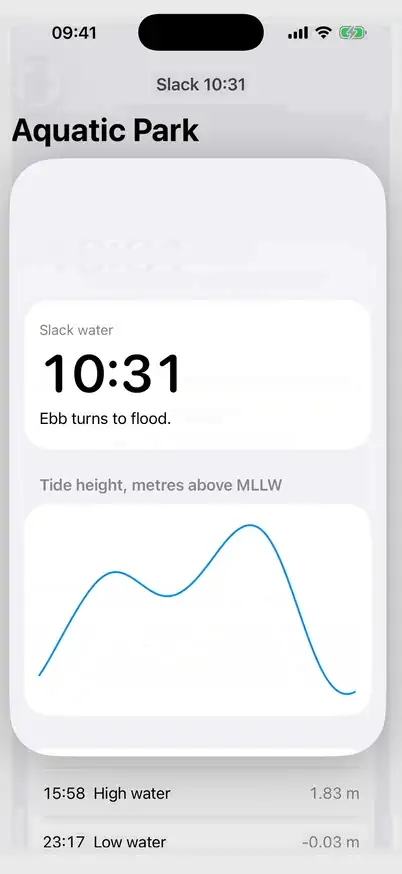
What the captures add to that: the build passes unchanged, the opening and the closing do what the thesis says, and the Reduce Motion path is a real cross-fade. They also show three things the audit could not see without running the app: the drag flickers, the travelling lines overlap, and large type breaks the hand-off between the row and the header. The audit did not count the loss of the edge-swipe back as a problem, although mobile-principles, which it loaded, says of that gesture “Never override”.
Does the motion match the thesis
Measured on the recordings at 60 frames a second (takes/segments.py on frames dumped by takes/frames.swift).
- The card grows from the row to the screen: yes.
media/open-early.png(about 70 ms after the tap) andmedia/open-mid.png(about 170 ms): the clip starts on the row’s card and reaches the screen edges, the corner radius goes from 16 pt to 0. - The three lines travel and the time scales to 56 pt: yes, with the overlaps listed below.
- No overshoot: yes. No frame shows the card or a line past its final place.
- The rest fades in after, and leaves first: yes. The curve, the “Slack comes” line and the switch are at partial opacity in
media/open-mid.pngand gone before the card has shrunk inmedia/close-mid.png. - Dragging the header down collapses the card: it does collapse, but the drag itself is broken (first defect).
- Timing. The picture changes for 0.8 s after the opening tap and 0.9 s after the closing tap: a spring declared at 0.45 s spends about as long again settling its last pixels. The system push it replaces changes the picture for about 0.43 s (opening) and 0.63 s (back), in
before/push.webp.
Defects the run introduced
- The drag that closes the detail flickers.
Etale/TideDetailView.swift:177,DragGesture(minimumDistance: 10), reads the finger in the header’s own coordinate space, and the header is inside the surface that the same drag moves (.offset(y: drag), line 65) and scales (line 64). Each frame the surface moves, the translation is measured again from the moved header, and the two answers alternate: over a 300 pt drag the top of the large time sits at 447, 490, 458, 508, 470, 526, 482, 546 px on successive frames (3 px to a point), and the gap between the two positions keeps growing as the finger goes down (media/defect-drag.webp, filmed at 60 fps;media/defect-drag-a.pngand-b.pngare two consecutive frames, 17 ms apart). Letting go still collapses the card. What a human would have to change: one line,DragGesture(minimumDistance: 10, coordinateSpace: .global). Tried in a copy outside this repository: it builds and the same drag then moves monotonically, without alternation. Not applied here: the build is shown as the run left it. - The time and the turn overlap in flight. The time scales from 20 pt to 56 pt about its leading edge while the turn line travels from the row’s second column to the header’s left margin, so for the first frames of the opening and the last of the closing the two are drawn over each other: “10:31” with “Ebb turns to flood” across its last digits (
media/open-early.png,media/close-mid.png). About 70 ms on the way in, longer on the way out, where the spring is slow. - The travelling lines cross the content that fades in. Mid-opening the next-current line passes over the divider and the “Tide height, metres above MLLW” label, both already partly visible (
media/open-mid.png). - The edge-swipe back is gone, and so is the navigation bar. The run says so and offers a header drag (broken, above), a close button and the accessibility escape. The detail is no longer a navigation destination: no back button, no title, no swipe from the left edge. SwiftUI has had a system transition for exactly this request since iOS 18 (
matchedTransitionSourceon the row and.navigationTransition(.zoom(sourceID:in:))on the destination), which keeps the stack, the bar and the interactive back gesture; the run did not consider it, and no genjutsu module mentions it (see “Notes”). - The screens were restyled to make the effect possible. Nobody asked for a new list: the grouped
List, its separators and chevrons were replaced by hand-drawn cards, and the detail lost its grouped sections and its “Current” row. The result is plainer than the starting detail: one white surface, its lower half empty (media/detail.png). - With large type the hand-off jumps. At the accessibility-large text size the row wraps its turn and next-current lines over several short lines, the header sets them on one and two, and the travel starts from the row’s frame with the header’s line breaks: the text re-breaks on the first frame, and the two-line next-current line lands across the divider on its way (
media/large-type-today.png,media/large-type-mid.png). The settled detail is fine (media/large-type-detail.png). One size was filmed, not the 200% the audit asks for. - A one-pixel pop after closing. The collapsed surface stays over the row until the spring is logically finished, then is swapped for the real row: the time’s glyphs change by about a pixel (a 56 pt face scaled down is not the 20 pt face) 1.1 to 1.2 s after the Close tap. Barely visible.
Suspected from the code, not demonstrated:
- The list cannot be tapped for about a second after Close.
TodayView.swift:94disables hit testing on the whole list whileselectedis set, andselectedis cleared in the completion ofwithAnimation(..., completionCriteria: .removed)(line 151), which the recording places 1.1 to 1.2 s after the tap. A second row tapped inside that second would do nothing. The driver waits for the app to be idle before each tap, so the takes cannot show it. - A tap on Close while the card is still opening, and a second row tapped while the first collapses: the code has guards for both, neither was filmed.
- The release of the drag decides on the same broken number.
TideDetailView.swift:184compares the local-space translation with 120 pt, the value that alternates during the drag, so whether a release between about 120 and 240 pt closes or springs back may depend on which of the two positions the last frame was in. Only the 300 pt drag was filmed. - Under Reduce Motion, a row reopened within 0.2 s of Close may lose its header drag.
close()clearsselectedat once and resetsisExpandedin the completion of the 0.2 s fade (TodayView.swift:141to:147); a row tapped inside that window setsisExpanded = true, then the pending completion sets it back tofalse, andcollapseDragignores every drag while it is false. The detail still shows and the close button still works. - The row’s frames are read once, at the tap (
TodayView.swift:117). If the text size changes while the detail is open, the card collapses onto where the row was, not where it is. - The growing clip is not free. The run’s audit is right that no layout property is animated, but the spring redraws a clip path every frame over a full-screen layer that holds a
ScrollViewand the stroked curve. Whether that hitches on a phone is the unmeasured item below.
Read in the code, not a defect: every API the run used exists at the iOS 26.0 deployment target and none is deprecated (visualEffect and withAnimation(_:completionCriteria:_:completion:) are iOS 17, onGeometryChange and scrollBounceBehavior older). The close button is drawn by hand (an xmark on tertiarySystemFill) instead of using a system close button, so it does not take the iOS 26 look of the rest of the system.
Not the run’s: the starting app sets the large time at a fixed 56 pt, which does not grow with Dynamic Type, and its rows wrap badly at large sizes. The run kept both.
Not verified here
A simulator on a Mac shows what the code draws, not how a phone feels.
- No real device. Frame pacing, hitches and 120 Hz were not measured: Instruments > Animation Hitches was not run, and a simulator recording cannot stand in for it.
- VoiceOver: the focus move to the header on open and back to the row on close, the modal trait, the escape gesture.
- Full Keyboard Access and the Esc shortcut on the close button.
- The flick that closes (predicted end past 240 pt), and a drag released before 120 pt.
- Opening a row after the list has scrolled (the screen fits on an iPhone 17, so the takes never scroll).
- Dynamic Type beyond the one size filmed, right-to-left, Increase Contrast, landscape (the app is portrait only) and iPad (iPhone only).
- Haptics: the code has none and the report claims none.
- Dark appearance was filmed once (
media/dark-mid.png,media/dark-detail.png) and looks right; its contrast was not computed, as the audit says.
Media
Filmed on the iPhone 17 simulator, iOS 26.5, 1206x2622 px (402x874 pt at 3x), with xcrun simctl io <udid> recordVideo --codec=h264 while a UI test performed the taps. The status bar is overridden (xcrun simctl status_bar <udid> override --time 9:41 --batteryState charged --batteryLevel 100 --cellularBars 4 --wifiBars 3).
The taps. simctl cannot tap. The driver is takes/driver: a UI test bundle in an Xcode project of its own, with no target application, that launches the installed app by bundle identifier (com.example.etale) and taps it through XCUITest. It is not part of the app build: the app’s project and code are not touched, and the same driver filmed the starting app. XCUITest draws no pointer, so the clips show no finger. takes/driver/take.sh starts the recording, runs one test and stops the recording.
The encode. This machine has no ffmpeg, and ImageMagick cannot decode H.264 without it. takes/frames.swift dumps the frames with AVFoundation, and takes/encode-clip.py encodes them with magick the way bin/record.mjs does. takes/make-media.sh holds every cut and every command; the recordings themselves (14 to 20 MB each) are not committed. Time is real, not virtual: these are screen recordings.
| File | Output | What it shows |
|---|---|---|
media/clip.webp |
402x874, 10 s, 24 fps, q66, 658 KB | The run’s build. Tap the 10:31 row at about 0.6 s: its card grows to the screen, the three lines travel, the curve and the switch fade in. Close at about 3.2 s: the content leaves, the card shrinks back into its row. The same on the 16:17 row at about 5.7 s and 8.4 s. No pointer is drawn. The time-over-turn overlap is visible at each start and end. |
media/today.png |
603x1311 | The Today screen at rest, as the run rewrote it. |
media/open-early.png |
603x1311 | About 70 ms after the tap: the card has left the row; “10:31” overlaps “Ebb turns to flood”. |
media/open-mid.png |
603x1311 | About 170 ms after the tap: the card near full size, the lines over the half-faded label and divider, the curve at partial opacity. |
media/detail.png |
603x1311 | The detail, settled. |
media/close-mid.png |
603x1311 | About 320 ms after Close: the card almost back on its row, content gone, the time over the turn line. |
media/alert.webp |
402x874, 5 s, 24 fps, q66, 208 KB | The switch “Alert me 15 minutes before” turned on in the detail, then Close: the bell is on the 10:31 row when the card lands. |
media/alert-row.png |
603x1311 | The row with its bell after that. |
media/defect-drag.webp |
320x696, 1.5 s, 60 fps, q62, 542 KB | The defect: the header dragged down 300 pt in one second. The surface alternates between two positions on successive frames. A browser that drops frames shows less of it than the stills. |
media/defect-drag-a.png, media/defect-drag-b.png |
603x1311 | Two consecutive frames of that drag, 17 ms apart: the surface about 35 pt down, then about 74 pt down with the list’s title showing above it. |
media/reduced.webp |
402x874, 4.2 s, 24 fps, q66, 189 KB | Reduce Motion on (xcrun simctl spawn <udid> defaults write com.apple.Accessibility ReduceMotionEnabled -bool YES, app relaunched): the detail cross-fades over the list in about 0.2 s, nothing grows or travels; the same back. |
media/reduced-mid.png |
603x1311 | The middle of that cross-fade: list and detail superimposed. |
media/dark-mid.png, media/dark-detail.png |
603x1311 | Dark appearance, mid-opening and settled. |
media/large-type-today.png, media/large-type-mid.png, media/large-type-detail.png |
603x1311 | Text size accessibility-large (xcrun simctl ui <udid> content_size accessibility-large): the list, mid-opening (the defect above), and the settled detail. |
media/preview.png |
1280x900 | preview/thesis.html, first screen, shot with bin/record.mjs (takes/preview-thesis.json). |
media/preview-variants.png |
1280x900 | preview/variants.html, first screen (takes/preview-variants.json). |
before/push.webp |
402x874, 12.4 s, 24 fps, q66, 704 KB | The starting app, same driver test: the system push to the detail and back, twice. |
before/today.png, before/push-mid.png, before/detail.png |
603x1311 | The starting app: the list, mid-push, the detail. |
Caption for the clip: The starting app pushed its tide detail like any navigation stack. The run replaced the push: the tapped row’s card grows into the detail and shrinks back, on one spring with no bounce. iPhone 17 simulator, built unchanged. The run rewrote both screens to do it, and its drag-to-close flickers (see the receipt).
Notes
- The harness.
bin/run.shwas run from a copy with two values changed: the cost ceiling (15 USD instead of 30) and the directory of the plugin copy (/private/tmp/genjutsu-eval-ex-ios, so as not to collide with another run on the same machine).bin/run.sh /path/to/genjutsu etale-ios 1 .is the same run. The fixture needs no template and no npm: it copiescases/etale-ios/app. - Grader score 1.00, five of five.
cast-fired,cast-loaded,list-opens-detail,swiftui-motion-loaded(one shell call loading the module) andtells-never-requested(none). - The starting app was built and launched before the run (Xcode 27.2, iPhone 17 simulator on iOS 26.5):
before/. Its project is generated by XcodeGen fromcases/etale-ios/project.ymland committed. - What genjutsu did not give the run.
skills/_jutsu/swiftui-motion/SKILL.md:28answers “Shared element transitions” withmatchedGeometryEffectonly, and neither that module,swiftui-graphicsnormobile-principlesnamesnavigationTransition(.zoom)andmatchedTransitionSource, the iOS 18 API for a list item that opens into its detail while keeping the navigation stack and its back gesture.swiftui-motion/SKILL.md:267teachesDragGesture().onChanged { value in offset = value.translation }without saying that a gesture attached to the view it moves must read its translation in.globalor a named space (references/gestures-swiftui.md:53presentscoordinateSpace:as “useful for cross-view drags”); that is the drag defect. Andmobile-principles/SKILL.md:194says of the edge-swipe back “Never override”, which the run loaded, set aside in one sentence, and did not count in its audit. - Where the numbers come from. Cost, turns, score, model and Claude Code version are in
runs/20261113T184049Z/aggregate-result.json. The tokens, the 898 s and the subagent count are in the run’s trace (trace.jsonlin the harness’s kept temp directory), which is not committed, like every other example’s. - Checked a second time. A separate pass replayed the trace’s
Writecalls: the three Swift files published here are byte for byte what the run wrote, with timestamps inside the run’s 15 minutes. It rebuilt a fresh copy ofworkspace-1with new derived data (Xcode 27.2, iPhone 17 simulator, iOS 26.5):** BUILD SUCCEEDED **, no compiler error or warning. That pass read frames of the committed clips, not the recordings: the growth, the travel, the overlaps, the drag flicker and the Reduce Motion cross-fade are in them; the 0.8 s and 0.9 s timings and the one-pixel pop were not measured again. - The run wrote its thesis page before loading its modules, as the pipeline orders it (thesis, then load), so the thesis was fixed before
swiftui-motionwas read. - The previews show a 9:12 status bar (the app’s fixed clock) and bold system fonts that differ from the simulator’s; they are throwaway mock-ups, not the build.
What was fixed in genjutsu between runs 1 and 2
Two commits on genjutsu’s branch fix/native-shared-element, fd4e1da and 3e0d6d3, on top of v4.1.4 (d5c614a). They were not released when run 2 was made (the plugin still called itself 4.1.4) and are part of the 4.2.0 release branch that runs 3 to 6 ran on. Run 2 ran on a copy of that branch at 3e0d6d3. Each gap named in run 1’s notes, and the file that now answers it:
- The system transition for “a row opens its detail”.
skills/_jutsu/swiftui-motion/SKILL.md:28now answers “Row or card opens a pushed or presented screen” withnavigationTransition(.zoom(sourceID:in:))andmatchedTransitionSource(id:in:), and keepsmatchedGeometryEffectfor a shared element inside one hierarchy. A new section at line 112, “Shared element transitions”, gives the sample, its availability, and what a hand-built overlay costs (line 144: the edge-swipe back, the bar, the VoiceOver escape, state restoration). - A drag that moves its own view.
skills/_jutsu/swiftui-motion/SKILL.md:310says a gesture that sits inside the.offsetit drives reads in.globalor a named ancestor, and why; the examples there, inskills/_jutsu/swiftui-motion/references/gestures-swiftui.md(the rule is at line 55) and inskills/_jutsu/mobile-principles/references/gestures-deep.mdnow passcoordinateSpace: .global. - “Never override” became a default with its reason.
skills/_jutsu/mobile-principles/SKILL.md:194: keep the edge-swipe back by default; replacing the navigation stack is a cost the thesis states, loss by loss; on iOS 18 and later the zoom transition keeps all of it. - The audit confronts the code with the modules.
skills/cast/SKILL.md:674(and the same lines inskills/paint/SKILL.mdandskills/bunshin/SKILL.md): a new check, “Loaded modules against code”. Every rule of a loaded module that the written code departs from is either licensed by a sentence of the validated thesis or a problem; an UNVALIDATED thesis licenses nothing. - Dated claims.
skills/_jutsu/VERSIONS.md, two rows dated 2026-11-13: the zoom navigation transition and theDragGesturecoordinate space.
Run 2: the fixed plugin, the system zoom transition
It compiles, it runs, and the transition is the system’s. Its code is in runs/20261113T201315Z/workspace-1, its media in media/run-2/.
| Skill | /genjutsu:cast |
| genjutsu | 4.1.4 plus the two module-fix commits that shipped in 4.2.0, at 3e0d6d3 (branch fix/native-shared-element; the harness prints “4.1.4”) |
| Model | claude-opus-5-5 (Claude Code 2.1.323, claude plugin eval, headless) |
| Date | 2026-11-13 |
| Cost | $1.53 (1.529563) |
| Turns | 22 |
| Duration | 330 s (5 min 30 s) in the run’s trace; the harness prints 331 s for the whole case |
| Subagents | 0 |
| Stack | SwiftUI, iOS 26.0 deployment target, Swift 5 language mode with MainActor default isolation, no dependency |
| Build | xcodebuild for the iOS 26.5 simulator (Xcode 27.2, iOS 27.2 SDK) succeeded on the first try, no compiler error, no compiler warning |
| Human edits | 0 made |
What it decided
Interaction thesis (UNVALIDATED, nobody was here to approve it), quoted from the final report:
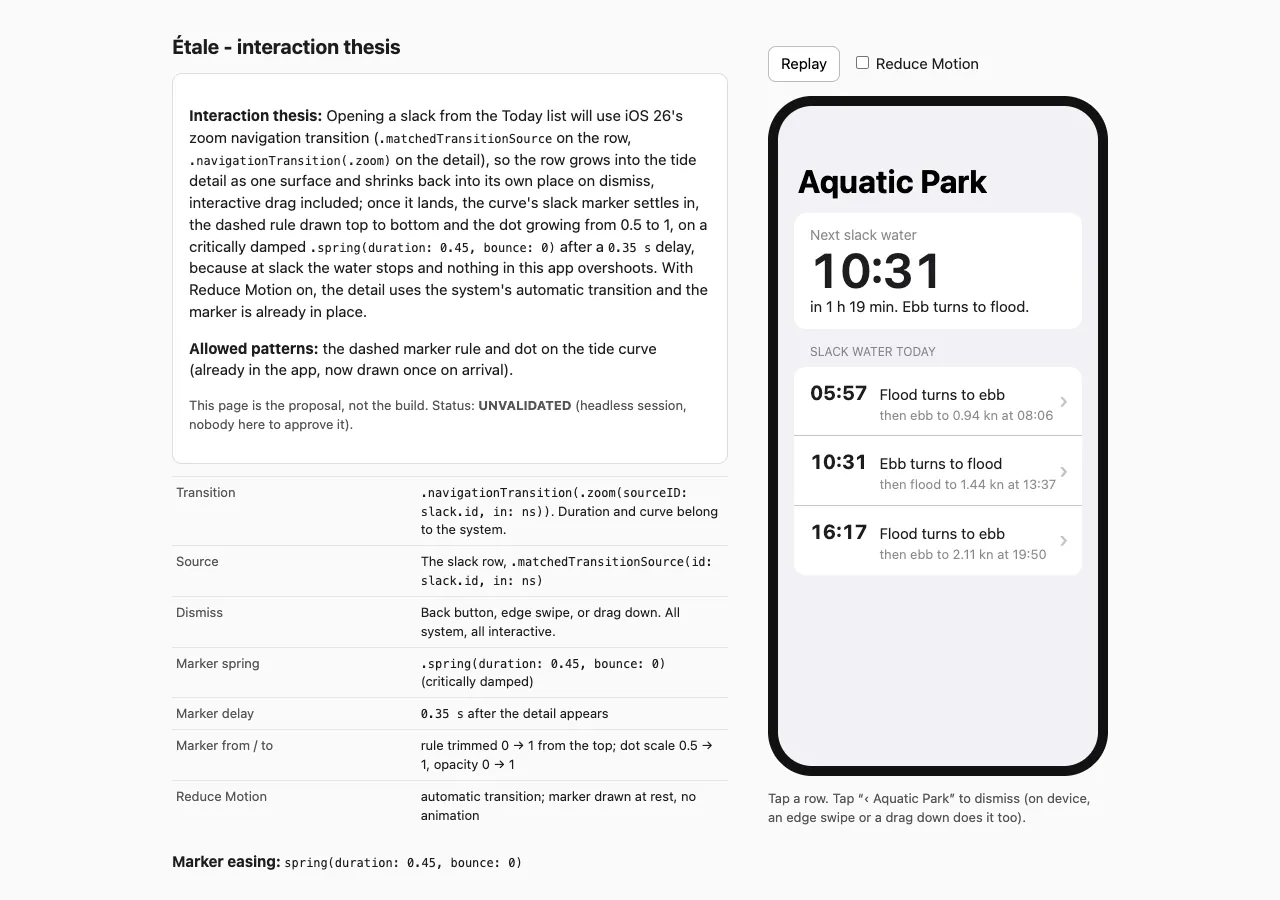
Opening a slack from the Today list uses iOS 26’s zoom navigation transition (
.matchedTransitionSourceon the row,.navigationTransition(.zoom)on the detail). The row grows into the tide detail as one surface and shrinks back into its own place on dismiss, including by dragging. Once the detail lands, the curve’s slack marker settles in: the dashed rule draws top to bottom and the dot grows from 0.5 to 1. It runs on a critically damped.spring(duration: 0.45, bounce: 0)after a 0.35 s delay, because at slack the water stops and nothing in this app overshoots. With Reduce Motion on, the detail uses the system’s automatic transition and the marker is already in place.
The thesis misdates the API: the zoom navigation transition is not new in iOS 26, it shipped in iOS 18. The code is right at this deployment target either way.
Allowed patterns: “the dashed marker rule and dot on the tide curve (already in the app, now drawn once on arrival)”.
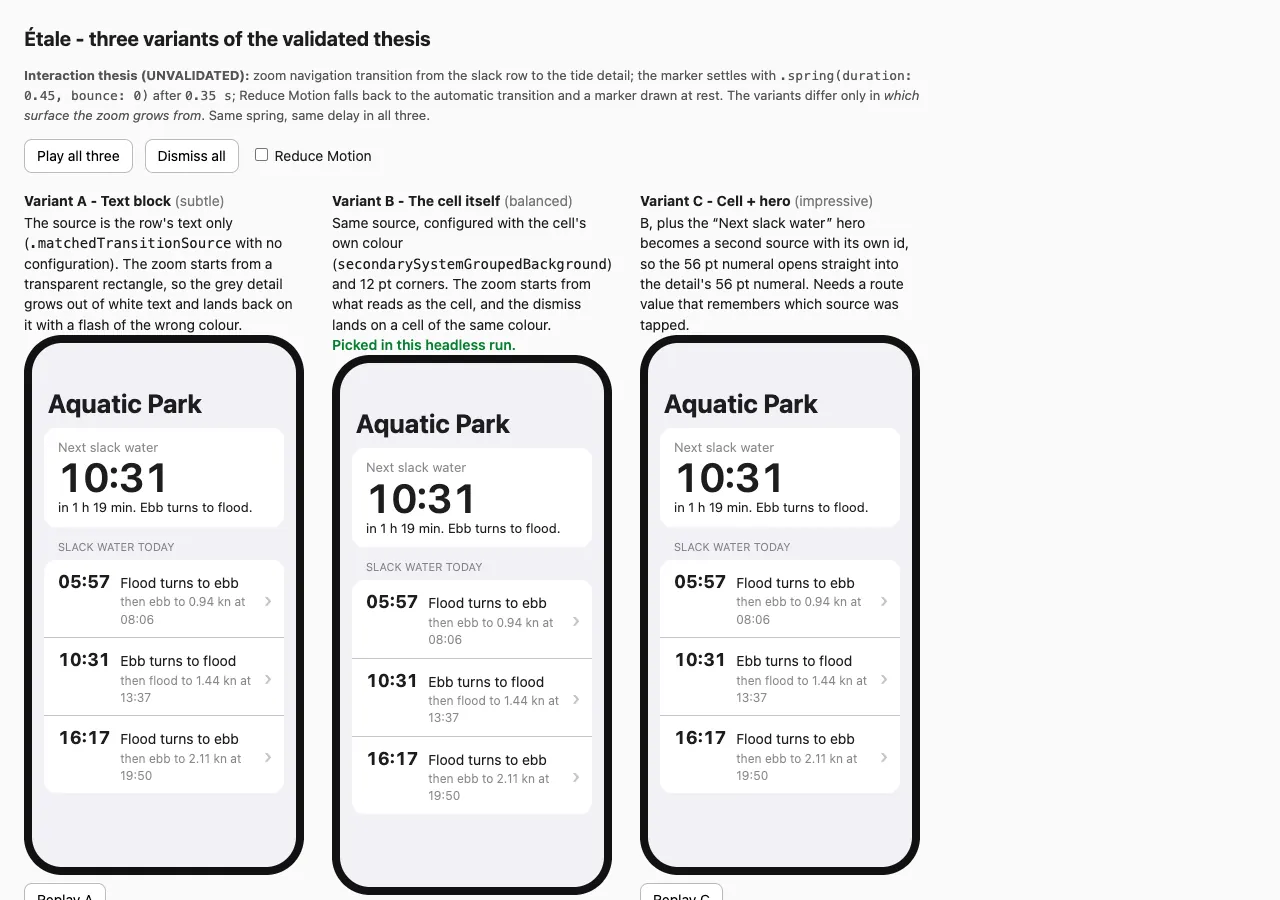
Variant picked: B, from three: the zoom starts from a surface coloured like the list cell, with 12 pt corners. A starts from the bare row. C also makes the “Next slack water” header open its slack, and was left out as outside the scope.
Assumptions it made, in its words “in place of questions”:
- The users are people who swim or paddle at Aquatic Park, opening a slack time to check the tide.
- “It stays a navigation destination. The back button, edge swipe and title bar keep working, and dismissing is interactive.”
- Variant B, because “A started from bare text and flashed the wrong colour on dismiss”. The run could not run anything, so that sentence describes its HTML mock-up, not SwiftUI.
Modules loaded (its load_skill calls): motion-principles, mobile-principles, swiftui-motion. Not loaded: none. tells was never requested.
The order matters. The run wrote preview/thesis.html, zoom transition included, before its first load_skill call: in the trace, the first occurrence of the word “zoom” is the run’s own thesis page, and nothing it had read until then (the app’s sources, the cast skill) names that API. The fixed modules were read after, and agree with it.
It showed before it wrote
preview/thesis.html(media/run-2/preview.png): the thesis, the allowed patterns, a phone mock-up, the numbers in a table, a Reduce Motion toggle, and the status UNVALIDATED.preview/variants.html(media/run-2/preview-variants.png): the three variants side by side, B marked “Picked in this headless run”.
Both are HTML approximations of a native screen, as in run 1.
What changed
3 Swift files, 78 insertions, 0 deletions against the starting app. Etale.xcodeproj, EtaleApp.swift, TideData.swift and tide.json are untouched.
Etale/TideTransition.swift(new, 55 lines): the motion constants,slackTransitionSource(the row as the zoom’s source, with a cell-coloured background and 12 pt corners) andslackZoomTransition, aViewModifierthat applies.navigationTransition(.zoom(sourceID:in:))unless Reduce Motion is on.Etale/TodayView.swift(3 lines added): a@Namespace, the source on eachSlackRow, the zoom on the destination. TheList, theNavigationStack, theNavigationLinkandnavigationDestinationare as they were.Etale/TideDetailView.swift(20 lines added, all insideTideCurve): the marker’s dashed rule is trimmed in from the top and its dot scales from 0.5 and fades in, once, on appear; drawn at rest under Reduce Motion.
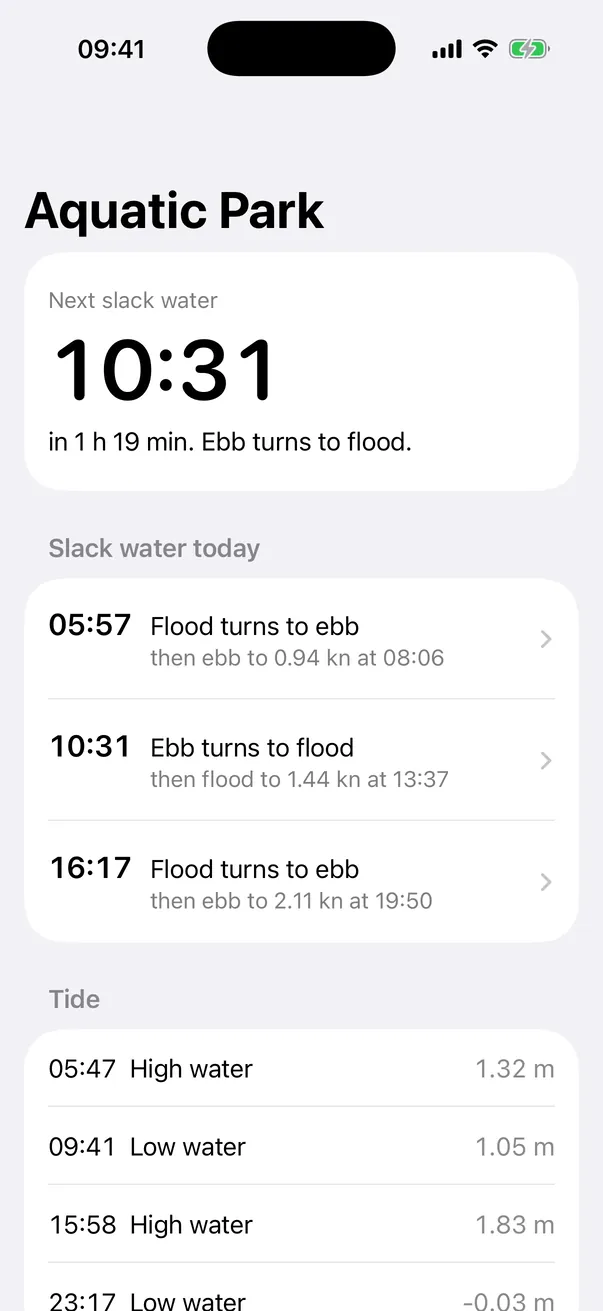
It did not redesign anything. At rest the two screens are the starting app’s: media/run-2/today.png against before/today.png and media/run-2/detail.png against before/detail.png differ only by video-compression noise. Of 790,533 pixels, 66 (today) and 0 (detail) differ by more than 2% of the colour range (5 of 255), scattered one by one along text edges over the whole height; the largest difference is 25 of 255 and 5 of 255. Counting every pixel that differs at all gives 26,705 and 1,810: these are frames of an H.264 recording, not screenshots. The grouped list, its chevrons, the navigation bar, its title, the back button, the grouped sections and the “Current” row are all there.
The build
cd etale-ios
cp -R runs/20261113T201315Z/workspace-1 build-20261113T201315Z-1
cd build-20261113T201315Z-1
xcodebuild -project Etale.xcodeproj -scheme Etale -configuration Debug \
  -destination "platform=iOS Simulator,id=<udid of an iPhone 17 on iOS 26.5>" \
  -derivedDataPath /private/tmp/etale-ios-run2-dd CODE_SIGNING_ALLOWED=NO build
** BUILD SUCCEEDED ** on the first try, with new derived data, no error and no warning from the Swift compiler. The only warning in the log is the one the starting app prints too: warning: Metadata extraction skipped, no AppIntents.framework dependency found.
Its own audit
“11 checked, 2 problems”, 3 handed over. Both problems come from the new check.
The check “Loaded modules against code” printed this (quoted, shortened only where marked):
- Problem: motion-principles says no UI interaction should take more than 500 ms. The marker starts at 0.35 s and settles after about 0.8 s (
TideTransition.swift:12,15,17). The detail can be read and used at once, so nothing waits on the marker. But the unvalidated thesis is what asks for this […], so it stays listed as a problem for you to accept or cut.- Problem, untested: the 0.35 s delay is a guess at how long the system zoom takes. The system sets that duration, not the app, so the marker may start a little before or after the zoom lands. Check it on a device.
- Note: if Reduce Motion changes while a detail is open, the detail rebuilds and its marker draws again. This is minor.
- mobile-principles: edge swipe kept, so no departure. swiftui-motion: the zoom sits on the detail’s root view, so no departure.
Was it true? Checked against the modules, the code and the film:
- The 500 ms rule exists (
skills/_jutsu/motion-principles/SKILL.md:211, “Never exceed 500ms on a UI interaction”), and 0.35 s of delay plus a 0.45 s spring is 0.8 s on paper. The run did what the new rule asks: its thesis is UNVALIDATED, so the thesis sentence licenses nothing and the departure is reported as a problem, with the sentence quoted. True. On film the marker is visibly finished sooner, about 0.55 s after the first frame of the zoom: the spring’s tail is too small to see. - The delay is a guess: true, and the film shows by how much. The zoom’s picture stops moving about 0.45 s after its first frame; the rule starts to draw at 0.33 s, during the last 2 px of the zoom’s settling, and the dot appears at 0.45 s (
media/run-2/marker-mid.png). It reads as the marker arriving with the landing, not after it. - “Edge swipe kept”: true, filmed (
media/run-2/edge-swipe.webp). - “The zoom sits on the detail’s root view”: true (
TodayView.swift:61, through the modifier atTideTransition.swift:52), and the zoom runs. - The note about Reduce Motion changing mid-screen: plausible from the code (the modifier’s two branches are two different views); not tried.
What the check did not list. Under Reduce Motion the run falls back to the system push, a full-screen sideways slide (media/run-2/reduced.webp). skills/_jutsu/swiftui-motion/SKILL.md:403 says that under reduced motion “large translations […] must be neutralized”. The slide is the system’s own and is what the starting app did, and the audit passed its Reduce Motion check on that basis; a strict reading of the module would have listed it as a departure. And no check could see the source-background defect below without running the app.
The rest of the audit: thesis against code with file:line for every sentence, exit animations, no layout property animated, focus, five states, tokens, semantics all pass; contrast “did not compute a ratio” for the system colour it added; tells not run. Handed over, UNVERIFIED: the build, Instruments > Animation Hitches, Reduce Motion with Dynamic Type at 200%.
Does the motion match the thesis
Measured on the recordings at 60 frames a second (takes/segments.py, and takes/track.py, which follows the blue tide curve frame by frame).
- The row grows into the detail as one surface and shrinks back: yes.
media/run-2/open-early.png(about 35 ms after the first frame) andmedia/run-2/open-mid.png(about 100 ms): the detail leaves from the row, the list dims behind it, the bar’s title and back button are already there.media/run-2/close-mid.png: the detail shrinks onto the row and cross-fades into it. - Dismiss by dragging: yes, two ways, both interactive. The edge swipe from the leading edge (
media/run-2/edge-swipe.webp,media/run-2/edge-swipe-mid.png) and a drag down (media/run-2/drag-down.webp,media/run-2/drag-down-mid.png): the detail follows the finger, shrinks, and on release lands on its row. - Does any drag flicker: no. Over the same 300 pt downward drag as run 1’s defect take, the tide curve’s top edge moves 1171 to 1874 px in 31 steps with 0 reversals over 78 frames at 60 fps; over the edge swipe its left edge moves 94 to 873 px with 0 reversals until the release, where it turns once towards the row. The motion comes in uneven steps with short plateaus (XCUITest’s synthetic drag, or the simulator’s pacing); it never goes back.
- The marker settles after the landing: about at the landing, see the audit above.
- Nothing overshoots: yes.
- Reduce Motion: honoured as the thesis says. The zoom is off, the detail arrives with the system push, the marker is in place from the first frame (
media/run-2/reduced.webp,media/run-2/reduced-mid.png). The edge-swipe back still works with Reduce Motion on (filmed, not published). - Timing. The picture changes for about 0.45 s after the opening tap (0.57 s with the marker) and 0.55 s on the way back, against 0.43 s and 0.63 s for the system push it replaces, and 0.8 s and 0.9 s for run 1.
Also filmed: the alert switch turned on in the detail, then back, the bell is on the row when the zoom lands (media/run-2/alert.webp, media/run-2/alert-row.png); dark appearance (media/run-2/dark-mid.png, media/run-2/dark-detail.png), which looks right; text size accessibility-large (media/run-2/large-type-today.png, media/run-2/large-type-mid.png, media/run-2/large-type-detail.png): the zoom runs, the row’s wrapped text cross-fades into the detail for a frame or two, nothing breaks.
Defects the run introduced
- A white box shows around the row after the detail lands back. The run gave the zoom’s source a background of its own (
TideTransition.swift:29to:33:secondarySystemGroupedBackground, 12 pt corners), so that the zoom starts from “a surface coloured like the list cell”. When the detail lands back the cell is still highlighted grey and that highlight fades over about 0.4 s: for that time the source’s white rounded rectangle sits inside the grey cell, narrower than it (it stops before the chevron), then the two colours meet and it disappears (media/run-2/defect-source-box.png; it shows at the end of every return inmedia/run-2/clip.webp). Measured on the recording at 60 fps: the cell outside the box is at its darkest (184 of 255) while the detail is still shrinking over it; when the zoom has landed, about 0.5 s after Back, it is already at 251 against the box’s 255, stays there, and snaps to white 0.92 s after Back. So the box is on screen for about 0.4 s at a faint contrast: easy to see in a still, slight at full speed. In dark appearance the two colours are closer and it is barely visible. This is the one visible thing run 2 added that a reviewer would ask to remove; dropping the configuration closure ofmatchedTransitionSourceis the likely change, not tried here. - The marker’s delay is a constant guessed against a duration the system owns. It happens to fall right on this simulator (above). If the system zoom is slower on a device or changes in a later iOS, the marker will draw during the zoom. The run’s audit says so itself.
- The marker may draw a second time if Reduce Motion changes while the detail is open (the run’s own note): the modifier’s two branches are two different views, so the detail is rebuilt and its
onAppearruns again. Read in the code (TideTransition.swift:49,TideDetailView.swift:116), not tried. - Under Reduce Motion the transition is the system push, a full-screen slide, not a cross-fade (see the audit). That is the starting app’s behaviour, kept; run 1 had a real 0.2 s cross-fade there.
Suspected from the code, not demonstrated:
- The marker’s one-time flag lives in a
Listrow.markerSettledis@StateofTideCurve(TideDetailView.swift:70), which sits in a row of the detail’sList, and the settle starts in that row’sonAppear(line 116). AListbuilds its rows lazily. Where the detail scrolls (large text sizes, a smaller phone), a curve below the fold would start its 0.35 s delay only when it scrolls in, and if the list drops the row’s state while it is off screen the marker would draw again on the way back. On the iPhone 17 at the default size the detail does not scroll, so no take can show it.
Not the run’s: the starting app’s row wraps its second line when the bell shows (media/run-2/alert-row.png), its rows wrap badly at large text sizes and its 56 pt time does not grow with Dynamic Type. The run changed none of it. While a zoom is dragged, the source row is hidden in the list and leaves a gap (media/run-2/edge-swipe-mid.png): that is how the system transition works.
What run 1 did that run 2 no longer does: no flickering drag, no text overlapping in flight, no lost edge swipe or bar, no restyled screens, no hand-off jump at large type, no second of dead list after closing (the list is a plain List, nothing disables it).
What run 2 does less of than run 1, to be fair to run 1: there is no bespoke choreography. Run 1’s three lines travelled to their places in the header on a spring the thesis owned; in run 2 the system cross-fades the row into the detail and owns the curve. The only motion that is Étale’s own is a 10 pt dot and a dashed rule. For “one surface, not a push” that is the right trade on iOS; as a show of what the plugin can author, it is modest.
Not verified here
- No real device and no iOS 18 runtime: frame pacing, hitches, 120 Hz. Instruments > Animation Hitches was not run.
- VoiceOver, Full Keyboard Access. Nothing custom was added, so the system’s behaviour is expected, and not checked.
- An edge swipe or a drag released early (the detail should spring back), and a tap during the zoom.
- Opening a row after the list has scrolled; the 16:17 row at the accessibility-large size (it is below the fold there and the driver cannot reach it, so only the 10:31 row was filmed at that size).
- Dynamic Type beyond the one size filmed, right-to-left, Increase Contrast, iPad.
- What the system zoom itself does under Reduce Motion: the run switches it off, so it was never seen.
- Dark appearance contrast (filmed once, not computed).
Media
Same device, recorder, status bar, driver and encode as run 1 (see run 1’s “Media”). The cuts and commands are in takes/make-media-run-2.sh; the recordings are not committed.
What changed in the driver, and why. takes/driver/EtaleDriver/EtaleDriver.swift drove run 2’s build with the same tests, with two changes:
testEdgeSwipeBackis new: a 300 pt drag from the leading edge. Run 1’s overlay had no such gesture to film.testAlertnow taps the switch at its trailing end instead of its centre. In the starting app and in run 2 the toggle is aListrow, one switch element as wide as the row, and a tap at its centre lands on the label and changes nothing (the first take of run 2 showed exactly that: no switch, no bell). Run 1’s hand-built detail took a centre tap. This is the driver’s adaptation to the screen, not an edit to the app.
testDragClose is unchanged: the same downward drag that showed run 1’s flicker.
| File | Output | What it shows |
|---|---|---|
media/run-2/clip.webp |
402x874, 12.3 s, 24 fps, q62, 693 KB | Run 2’s build. Tap the 10:31 row at about 0.6 s: the detail zooms out of the row, the marker settles on the curve. Back button at about 4.1 s: the detail shrinks into its row. The same on the 16:17 row at about 7.4 s and 10.9 s. No pointer is drawn. The white box is visible on the row at the end of each return. |
media/run-2/today.png |
603x1311 | The Today screen at rest: the starting app’s, unchanged. |
media/run-2/open-early.png |
603x1311 | About 35 ms after the first frame of the zoom. |
media/run-2/open-mid.png |
603x1311 | About 100 ms: the detail near full size, the list dimmed behind. |
media/run-2/marker-mid.png |
603x1311 | About 370 ms: the zoom all but landed, the dashed rule drawn, the dot not yet. |
media/run-2/detail.png |
603x1311 | The detail, settled: navigation bar, title, back button, grouped sections. |
media/run-2/close-mid.png |
603x1311 | About 170 ms after Back: the detail shrinking onto its row. |
media/run-2/defect-source-box.png |
603x1311 | About 0.6 s after Back: the white source rectangle inside the still-grey 10:31 cell. |
media/run-2/edge-swipe.webp |
402x874, 2.4 s, 24 fps, q62, 424 KB | The edge-swipe back: a 300 pt drag from the leading edge over one second, then release. |
media/run-2/edge-swipe-mid.png |
603x1311 | Mid-swipe: the detail under the finger, smaller, the list behind with a gap where the row is. |
media/run-2/drag-down.webp |
402x874, 2.4 s, 24 fps, q62, 384 KB | The same downward drag as run 1’s media/defect-drag.webp: the detail follows and shrinks, no alternation. |
media/run-2/drag-down-mid.png |
603x1311 | Mid-drag. |
media/run-2/alert.webp |
402x874, 5 s, 24 fps, q66, 212 KB | The switch “Alert me 15 minutes before” turned on, then Back: the bell is on the 10:31 row. |
media/run-2/alert-row.png |
603x1311 | The row with its bell after that. |
media/run-2/reduced.webp |
402x874, 4.5 s, 24 fps, q66, 375 KB | Reduce Motion on: the system push and pop, no zoom, the marker in place from the first frame. |
media/run-2/reduced-mid.png |
603x1311 | The middle of that push. |
media/run-2/dark-mid.png, media/run-2/dark-detail.png |
603x1311 | Dark appearance, mid-zoom and settled. |
media/run-2/large-type-today.png, media/run-2/large-type-mid.png, media/run-2/large-type-detail.png |
603x1311 | Text size accessibility-large: the list, mid-zoom, the settled detail. |
media/run-2/preview.png |
1280x900 | preview/thesis.html, first screen (takes/preview-thesis-run-2.json). |
media/run-2/preview-variants.png |
1280x900 | preview/variants.html, first screen (takes/preview-variants-run-2.json). |
Caption for the clip: The same case on the fixed plugin. The run used the system zoom transition: the tapped row opens into its tide detail and shrinks back, the navigation bar and the swipe back stay, and the slack marker settles on the curve. iPhone 17 simulator, built unchanged. A white box shows on the row for a moment after each return (see the receipt).
Notes
- The harness. The same copy of
bin/run.shas run 1 (cost ceiling 15 USD, plugin copied to/private/tmp/genjutsu-eval-ex-ios), pointed at the genjutsu worktree onfix/native-shared-element, clean at3e0d6d3. One run was made on that commit and it is this one; four more runs of the same prompt followed on later commits (runs 3 to 6). - Grader score 1.00, five of five, the same five graders as run 1. Run 1 scored 1.00 too, with its flickering drag: these graders check that the skill fired, loaded its module and touched the list, not whether the motion is good.
- Where the numbers come from. Cost, turns, score, model and Claude Code version are in
runs/20261113T201315Z/aggregate-result.json. The tokens, the 330 s and the subagent count are in the run’s trace, which is not committed. - Hygiene. In
run.logandreport.htmlthe path into this repository was made relative and each U+2014 dash became “-”, as the README says. The run’s final report sets three of its headings with that dash; they are quoted here without it. - Checked a second time. A separate pass replayed the trace’s three
Writecalls and sixEditcalls on the starting app: the three Swift files and the two previews published here are byte for byte what the run wrote. It rebuilt a fresh copy ofworkspace-1with new derived data (Xcode 27.2, iPhone 17 simulator, iOS 26.5):** BUILD SUCCEEDED **, no compiler error or warning. It dumped the recordings of the two drags again at 60 fps and followed the curve with its own script: the downward drag goes 1171 to 1874 px without ever going back, the edge swipe 94 to 873 px and turns once at the release; in the committed clips, the same tracker counts 0 reversals inmedia/run-2/drag-down.webpand 56 in run 1’smedia/defect-drag.webp. It searched the trace: nothing before the thesis page names the zoom API, the edge swipe or a shared element, and the plugin copy the harness ran is identical to3e0d6d3. It checked the cost, turns, duration, tokens and subagent count against the trace, the audit quotes against the run’s final report, and thefile:linecitations against genjutsu at3e0d6d3. It corrected the pixel counts of the screens at rest, which had been read from an ImageMagick figure that is not a pixel count, and added the measurement of the white box, the misdated API and theListrow item above. Not done again: no new recording was filmed, and the opening and closing timings were not measured a second time beyond the opening of the 10:31 row (zoom about 0.45 s, dot at 0.45 s: the same).
Run 3: the 4.2.0 release branch, a hand-built surface again
It compiles and it runs. It is not ready to ship, and it is the same mistake as run 1 on modules that now teach the other way. Its code is in runs/20261113T213153Z/workspace-1, its media in media/run-3/. This was a smoke run of the release branch before the release, not a run made for this page; it is here because it is a run of this prompt and it went the other way.
| Skill | /genjutsu:cast |
| genjutsu | release/v4.2.0 at 5105f53 (the harness prints “4.2.0”); the module fixes of run 2 are in it, the step of runs 4 to 6 is not |
| Model | claude-opus-5-5 (Claude Code 2.1.325, claude plugin eval, headless) |
| Date | 2026-11-13 |
| Cost | $2.46 (2.4578198) |
| Turns | 25 |
| Duration | 605 s in the run’s trace; the harness prints 606 s for the whole case |
| Subagents | 0 |
| Build | xcodebuild for the iOS 26.5 simulator succeeded on the first try, no compiler error, no compiler warning (only the AppIntents metadata warning the starting app prints too) |
| Human edits | 0 made |
What it decided
Interaction thesis (UNVALIDATED, nobody was available to answer), quoted from the final report:
Tapping a slack row grows that row, in place, into the tide detail as one surface on a critically damped spring (
.spring(duration: 0.45, bounce: 0), since slack water does not overshoot). The slack time is the still point: it moves from the row to the head of the detail and never fades. The rest of the detail fades in and rises 12 pt over the second half of the travel. Dragging the head down, or swiping in from the leading edge, shrinks the surface back into its row under the finger. With Reduce Motion on, the finished detail crossfades in over 200 ms instead. Leaving the push loses the edge-swipe back, the bar and its back button, the VoiceOver escape gesture and the navigation path. A leading-edge swipe, a close button and.accessibilityAction(.escape)replace the first three; nothing replaces the path, which the app does not restore or deep-link today.
The order. The run wrote its preview (preview/slack-surface.html, the hand-built surface) before its three module loads. Nothing it wrote before the loads names the zoom transition; the first occurrence of the word in the trace is in what swiftui-motion and mobile-principles returned. After reading them it kept its surface and edited the preview’s thesis to name what leaving the push costs: the two last sentences above. That is what the fixed mobile-principles asks of a thesis that replaces the stack (“a cost the thesis states, loss by loss”), and it is all it did: the modules were read, the cost was written down, the decision stood. Its reasoning summary in the trace, right after the loads: “Since the brief rules out a push, I’m keeping the custom surface, naming each replacement in the thesis, and adding a leading-edge swipe.”
Modules loaded: motion-principles, mobile-principles, swiftui-motion. Not loaded: none.
What changed
3 Swift files, 434 insertions, 59 deletions against the starting app.
Etale/SlackSurface.swift(new, 280 lines): the surface, its clip, the travelling time, the head drag, a 20 pt leading-edge strip that stands in for the edge swipe, the close button, every motion number.Etale/TodayView.swift(rewritten): rows are buttons that open the surface;NavigationLinkandnavigationDestinationare removed.Etale/TideDetailView.swift: now only the detail’s body; its header moved into the surface and its navigation title is gone.
Its own audit
“10 checked, 5 problems found, 3 handed over”. The check “Loaded modules against code” printed three problems, quoted:
- Hand-built surface instead of the system zoom transition (
mobile-principles, swipe-back;swiftui-motion, zoom transition). Problem, atTodayView.swift:21-45. The thesis sentence that covers it: “Leaving the push loses the edge-swipe back, the bar and its back button, the VoiceOver escape gesture and the navigation path…”. iOS 18+’s zoom transition would keep all four of those, but the system sets its timing and can’t move the time on its own.- Exit is not quieter than entry (
motion-principles). Problem, atTodayView.swift:125. Closing reverses the full 0.45 s spring rather than using a short fade.- Leading-edge strip intercepts touches. Problem, at
SlackSurface.swift:208-219. The 20 pt strip catches taps and the start of scrolls along the detail’s leading edge.
All three are true, and the first is the whole matter. The check worked as written: the thesis is UNVALIDATED, so its sentence licenses nothing and the departure is a problem. But the check runs on written code, and with nobody answering nothing acts on what it lists. The run shipped the surface with its own audit saying the system transition would have kept everything it gave up.
Defects the run introduced
Seen on the recordings (media/run-3/), three takes: open and close, edge swipe, drag down.
- The time lands on the wrong row. After a return, “10:31” sits in the 05:57 row, under “05:57”, and the 10:31 row has no time (
media/run-3/defect-wrong-row.png; it stays that way at rest). - The large time sits under the Dynamic Island. In the settled detail the 56 pt “10:31” is drawn at the very top of the screen, behind the status bar and the island, over its own “Slack water” label (
media/run-3/detail.png). - The Today list shows under the detail. The settled detail does not cover the screen: the last rows of the Tide section are visible below the alert switch (
media/run-3/detail.png). - Both screens were restyled, as in run 1: no navigation bar, no title, no back button, a close button top right, the rows’ text in the tint colour, no disclosure chevrons (
media/run-3/today.png). - After the drag, a white card with only the time stays over the first two rows in the last frames of the take (
media/run-3/drag-down.webp).
Not measured for this run: whether the drag flickers frame by frame (run 1’s defect), the timings, Reduce Motion, dark appearance, large type.
Notes
- The harness. A copy of
bin/run.shwith its paths changed, pointed at a copy of genjutsu at5105f53. One run was made. - Grader score 1.00, five of five.
- Hygiene. As for the other runs, and one more change: the run’s own
preview/slack-surface.htmlhad a U+2014 dash in its<title>; it is “ - “ here. Nothing else in the workspace was touched. - Media. Filmed by the pass that measured the run, on the same simulator with the same driver (
takes/driver, teststestOpenAndClose,testEdgeSwipeBack,testDragClose). Its cut and encode commands were not kept; the recordings are not committed.
| File | Output | What it shows |
|---|---|---|
media/run-3/clip.webp |
402x874, 10.4 s, 470 KB | Open and close, twice. The time lands under “05:57” on each return. |
media/run-3/edge-swipe.webp |
402x874, 2.4 s, 118 KB | A swipe from the leading edge: the surface shrinks back. |
media/run-3/drag-down.webp |
402x874, 2.7 s, 258 KB | The head dragged down: the surface collapses, a white card with the time stays. |
media/run-3/today.png |
603x1311 | The Today screen at rest, restyled. |
media/run-3/detail.png |
603x1311 | The settled detail: the time under the Dynamic Island, the list showing below. |
media/run-3/defect-wrong-row.png |
603x1311 | After a return: “10:31” in the 05:57 row. |
What was added to genjutsu after run 3
Two commits on release/v4.2.0, 779f16c and 844f375, on top of 5105f53. Runs 4, 5 and 6 ran on a git archive of 844f375.
- The cause they aim at. In
castthe thesis and its preview are written before the modules load (thesis gate, then LOAD). What a module teaches arrives after the decision. Headless, the thesis is UNVALIDATED, so the audit check can only list the departure as a problem once the code exists: run 3. - The step.
skills/cast/SKILL.mdandskills/paint/SKILL.md, the same text in both: “Read the thesis against the modules, before any code.” After the last module load, walk the rules of each loaded module that bear on what the thesis promises. A gap is a thesis that builds by hand what a module says the platform provides, or that gives up something a module rule protects. A value chosen where a module gives a range is a decision, not a gap. Print one line per gap, orThesis against modules: no gap. - With someone there: a thesis a person approved is never changed silently; each gap is asked once, revise or keep.
- With nobody answering: nobody accepted the cost, so the module’s way stands: rewrite the thesis on it, changing only what the gap touches, print it whole, marked UNVALIDATED, with one line,
Revised after LOAD: <what changed> - <module, rule>. A departure is kept only when the request asks, in its own words, for a result the module’s way cannot give; “not a push” asks for what is seen, not for an API. - The audit check “Loaded modules against code” still runs afterwards, on the code.
Runs 4, 5 and 6: the release branch with the step
All three compile, run and use the system zoom. None shows the step correcting a hand-built thesis: none wrote one. Their code is in runs/20261113T220815Z/workspace-1 (run 4), runs/20261113T220814Z/workspace-1 (run 5) and runs/20261113T220820Z/workspace-1 (run 6); their media in media/run-4/, media/run-5/ and media/run-6/.
| Run 4 | Run 5 | Run 6 | |
|---|---|---|---|
| genjutsu | release/v4.2.0 at 844f375 |
the same | the same |
| Model, harness | claude-opus-5-5, Claude Code 2.1.325, claude plugin eval, headless |
the same | the same |
| Cost | $1.36 (1.3550284) | $1.30 (1.2995434) | $1.31 (1.3110324) |
| Turns | 19 | 18 | 23 |
| Duration | 268 s | 262 s in the trace, 263 s printed | 269 s |
| Subagents | 0 | 0 | 0 |
| Swift changed | TodayView.swift, 15 insertions |
TodayView.swift, 13 insertions |
TodayView.swift +7, TideDetailView.swift +15 -1 |
| Build | first try, no compiler warning | first try, no compiler warning | first try, no compiler warning |
| Modules loaded | motion-principles, mobile-principles, swiftui-motion | the same | the same |
| Human edits | 0 | 0 | 0 |
What each thesis said, and when
In each run the thesis page was written before the first module load and already names matchedTransitionSource and navigationTransition(.zoom) (preview/today-to-detail.html in run 4, preview/thesis.html in runs 5 and 6). The trace of each run shows the order: the Write of that page, then the three loads.
- Run 4, final thesis: “Tapping a slack-water row in Today makes that row grow into its tide detail, using SwiftUI’s zoom navigation transition (
.matchedTransitionSourceon the row,.navigationTransition(.zoom)on the detail). The system sets the timing. The time you tapped becomes the detail’s 56 pt headline. A back-swipe or a pull-down shrinks the detail into the same row, with the bell showing any alert you just set.” - Run 5, final thesis, headed “UNVALIDATED, revised after LOAD”: the same zoom, “The timing is the system’s: the app sets no duration. With Reduce Motion on, the app keeps the same zoom call and leaves the reduced version to the system, which owns that transition. It never swaps in the default push.”
- Run 6, final thesis: the same zoom, and “As the detail arrives, the day’s tide line draws left to right through the slack marker with
.smooth(duration: 0.45), no delay. With Reduce Motion, the system’s own handling replaces the zoom and the line is shown already drawn.” It also wrote, among its assumptions: “I read ‘not a push’ as how it should look, not as a ban on navigation.”
What the step printed
- Run 4, in the final report, word for word: “Thesis against modules: no gap. The thesis already uses the approach the SwiftUI module recommends for a row that opens a screen, and it keeps the back-swipe.” No revision.
- Run 5, under the thesis, word for word:
Revised after LOAD: Reduce Motion no longer falls back to the default push (a full-width slide) - motion-principles / swiftui-motion, reduced motion: large translations are neutralized. One sentence of the thesis changed. Before the load (preview/thesis.html): “With Reduce Motion on, the app drops the zoom and the detail arrives with the system’s default transition.” The gap line in the step’s format (<module>, <rule> - <what the thesis does instead>) was never printed, nor “no gap”. - Run 6, under the thesis, word for word:
Revised after LOAD: line draw 0.6 s + 0.2 s delay → 0.45 s, no delay - motion-principles, never exceed 500ms on a UI interaction, and in the report: “Thesis against modules, after loading: one gap, the line draw ran over 500 ms. I fixed it in the thesis before writing any code, as the revised line above shows.” The step’s text says a value the thesis chose is a decision left to the audit, not a gap: this revision is outside what the step defines. - In all three the step’s output is in the final report only; nothing was printed between the loads and the first edit. In runs 5 and 6 the preview made before the load got the first line the step asks for, “Shows the thesis before its revision after LOAD”, and was not rebuilt. Run 4 says itself that it wrote
preview/variants.htmlafter the code, “the wrong order”.
Their audits, “Loaded modules against code”
- Run 4 (“8 checked, 1 problem found, 1 not checked, 3 not applicable, 2 handed over”): “no departure. SwiftUI module: same id and namespace on both sides, and the zoom sits on the detail’s root view (
TodayView.swift:70). Mobile module: the swipe-back is kept.” Its one problem is the 12 pt corner radius typed in (TodayView.swift:81). Reduce Motion: not checked, no guard, left to the system. - Run 5 (“10 checked, 1 problem found, 1 not checked”): “No departure: The zoom is on the destination root, outside any container. The id and namespace are the same on both sides. The swipe-back is kept […]. Nothing scales to 0 and no duration is set.” Its one problem is
cornerRadius: 12(TodayView.swift:42). Reduce Motion: not checked. The revision above removed the only Reduce Motion path the first thesis had, so the code has no guard, and the audit hands the question to a device. - Run 6 (“9 checked, 1 problem found, 1 not checked, 2 not applicable”): “1 problem.
swiftui-motion, reduced motion (‘large translations, scale … must be neutralized’):TodayView.swift:65applies the zoom even with Reduce Motion on. The thesis line ‘With Reduce Motion, the system’s own handling replaces the zoom’ is unvalidated, so it doesn’t justify this. Problem. I left it unfixed: switching the zoom off would bring back the sideways push slide […].” The problem is true in the code. The step, before the code, had not raised it, although reduced motion is one of the things the step’s text names.
What the captures show
Each build was filmed on the same simulator with the same driver, three takes: open and close, edge swipe, drag down. Reduce Motion, dark appearance and large type were not filmed for these runs.
- Stack, bar, back button, edge-swipe back: kept in all three, visible on the frames; the swipe from the leading edge is interactive and lands the detail on its row (
media/run-4/edge-swipe.webp,media/run-5/edge-swipe.webp,media/run-6/edge-swipe.webp). - No drag flickers. Over the 300 pt downward drag at 60 fps: run 4, 0 reversals over 75 samples; run 5, 0 reversals over 73 frames (the curve’s top from 1171 to 1908 px); run 6, 0 reversals over 80 frames (1171 to 2050 px). On the edge swipe the only reversals come at the release, when the detail turns back towards its row.
- None of run 3’s defects: the time lands on the right row, nothing sits under the Dynamic Island, the list does not show under the settled detail. The two screens at rest are the starting app’s.
- Timing (the picture changes for): run 4, 0.63 s opening and 0.93 s closing; run 5, 0.55 s and 0.97 s; run 6, 0.53 s and 0.53 s.
Defects these runs introduced
- Run 4: a white box much taller than the row on every return. The run gave the zoom’s source the cell’s background and 12 pt corners (
TodayView.swift:36-42), as run 2 did. On the way back the source comes back as a white box far taller than the row, its text at the top; it covers the 05:57 and 16:17 rows for about 4 frames at 30 fps (130 ms), and “10:31” passes over the 05:57 row before it settles (media/run-4/defect-source-box.png, four frames of one return). On opening, for 1 to 2 frames, the 10:31 row floats above the 05:57 row. - Run 5: the same white box, on opening and on return. Same cause (
TodayView.swift:39-43). About 0.3 to 0.4 s after Back a large rounded white rectangle, nearly empty, covers the 10:31 and 16:17 rows; then a narrower one (it stops before the chevron) stays inside the still-grey cell until about 1 s after Back (media/run-5/defect-source-box.png). This is run 2’s defect, more marked. - Run 5: no Reduce Motion path at all, after its own revision. What the system zoom does with Reduce Motion on was not filmed.
- Run 6: the line draw cannot be seen. The thesis promises the tide line drawing left to right over 0.45 s. On the recording the curve is complete from the first frame where it appears, about 30 ms after the zoom starts (
media/run-6/open-mid.png, about 100 ms in: the whole curve is there). No left-to-right draw is visible at 60 fps, on either opening. - Run 6: the row’s text floats over the shrinking detail for a few frames on return (
media/run-6/close-mid.png). That is the system zoom’s own cross-fade, also present in run 2. Run 6 gave the source no background, so it has no white box. - Run 6: the zoom runs with Reduce Motion on (its audit’s open problem), not filmed.
Notes
- The harness. The same copy of
bin/run.shas run 3 with its paths changed, cost ceiling 6 USD, pointed at agit archiveof genjutsu at844f375; the case and the tools came from agit archiveof this repository at3a147db. Three calls of one run each, started side by side. No run was made again. - Claude Code 2.1.325 for runs 3 to 6, against 2.1.323 for runs 1 and 2.
- Where the numbers come from. Cost, turns, score, model and Claude Code version are in each run’s
aggregate-result.json. The durations, the order of the thesis page and the loads, and the quotes of the final reports come from each run’s trace and final report, which are not committed. - Hygiene. In
run.logandreport.htmlthe path into this repository was made relative and each U+2014 dash became “ - “. No file of these three workspaces was changed. - Media. Runs 4 and 6: cut and encoded by the pass that measured each run; the commands were not kept. Run 5: the measuring pass left recordings and 60 fps frames only, and the three clips were encoded afterwards from those frames with
takes/encode-clip.py(24 fps, q62, 402 px wide). The recordings are not committed. Stills are frames of the recordings at 603x1311, except run 4’s defect sheet.
| File | Output | What it shows |
|---|---|---|
media/run-4/clip.webp |
402x874, 12.1 s, 722 KB | Run 4: open and back on the 10:31 row, then on the 16:17 row. The tall white box shows on each return. |
media/run-4/edge-swipe.webp, media/run-4/drag-down.webp |
402x874, 2.7 s each, 436 and 413 KB | Run 4: the edge-swipe back and the 300 pt drag down. |
media/run-4/today.png, media/run-4/detail.png |
603x1311 | Run 4: the two screens at rest, the starting app’s. |
media/run-4/defect-source-box.png |
2000x1087 | Run 4: four frames of one return, the white box over the rows. |
media/run-5/clip.webp |
402x874, 5.2 s, 378 KB | Run 5: open and back on the 10:31 row. |
media/run-5/edge-swipe.webp, media/run-5/drag-down.webp |
402x874, 2.5 and 2.4 s, 440 and 397 KB | Run 5: the edge-swipe back and the drag down. |
media/run-5/today.png, media/run-5/detail.png |
603x1311 | Run 5: the two screens at rest. |
media/run-5/defect-source-box.png |
603x1311 | Run 5: after Back, the narrower white rectangle inside the still-grey 10:31 cell. |
media/run-6/clip.webp |
402x874, 11.6 s, 721 KB | Run 6: open and back, twice. No white box; no visible line draw. |
media/run-6/edge-swipe.webp, media/run-6/drag-down.webp |
402x874, 2.4 s each, 425 and 435 KB | Run 6: the edge-swipe back and the drag down. |
media/run-6/today.png, media/run-6/detail.png |
603x1311 | Run 6: the two screens at rest. |
media/run-6/open-mid.png |
603x1311 | Run 6, about 100 ms into the zoom: the tide curve already whole. |
media/run-6/close-mid.png |
603x1311 | Run 6, about 200 ms after Back: the row’s text over the shrinking detail. |
Not verified, for runs 3 to 6
- No real device: frame pacing, hitches, 120 Hz. Instruments > Animation Hitches was not run.
- Reduce Motion, dark appearance, large type, VoiceOver, Full Keyboard Access: not filmed and not checked for any of these four runs.
- The measurements of runs 3 to 6 were each made by one pass and were not checked a second time, unlike runs 1 and 2. For this page, the Swift line counts were counted again against the starting app, the order “thesis page, then module loads” was read again in each trace, and the stills were looked at again.
- No run has shown the step revising a hand-built thesis. That path is untested.